 Figpea
What We Collect
Your design files are processed entirely on your machine — they never leave it, so there is nothing file-shaped to send anywhere, unless you explicitly choose to submit a broken-file report to help us fix a parsing bug. What we do send is usage metadata, and this page lists every piece of it. Event payloads carry no file names, no file contents, and no email addresses. The two error events are the exception: they also carry the error's own message text and a short code name for the part of Figpea that failed, which is explained in What is never collected.
The two systems we run
- Google Analytics 4 runs on both this website and the editor. It records page views and the behavior events listed below — nothing else.
- Vercel Analytics records anonymous, cookieless page-view counts for this website only — a raw traffic baseline. It never receives custom events, and it does not run in the editor.
Events this website sends
This is the complete list of behavior events this website sends, together with every piece of data each one carries:
| Event | When it fires | Data it carries |
|---|---|---|
editor_open_click | You click a link that opens the Figpea editor | source_path — the path of the page you clicked from (never the query string) |
checkout_started | You start a checkout | billing — the billing interval (monthly or yearly) or pass for the one-time Rescue Pass |
checkout_completed | You return from a successful checkout (counted once per checkout) | billing — the billing interval |
login_completed | You sign in (counted once per login) | nothing |
The events listed above are sent by this website (figpea.com) only. The Figpea editor runs on a separate domain and sends its own, separate set of events — those are listed in the next section.
Events the editor sends
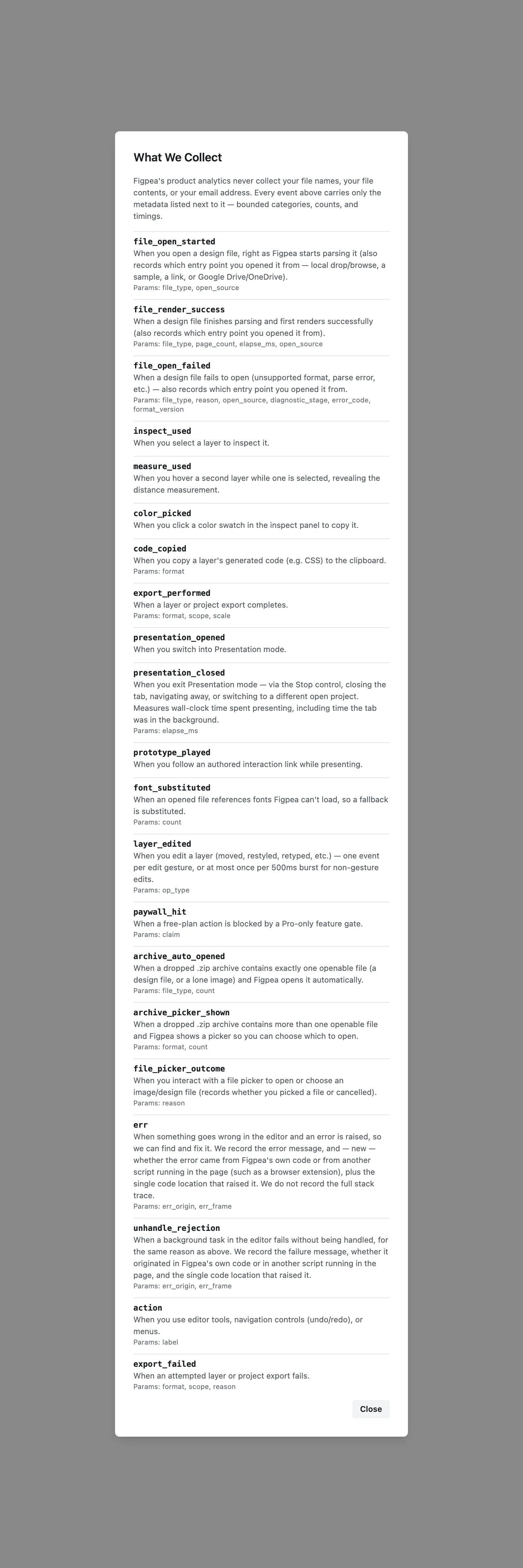
The Figpea editor at editor.figpea.com sends its own set of events. This is the complete list. You can see the same list inside the editor at any time — open the main menu and choose What We Collect.
| Event | When it fires | Data it carries |
|---|---|---|
file_open_started | When you open a design file, right as Figpea starts parsing it (also records which entry point you opened it from — local drop/browse, a sample, a link, or Google Drive/OneDrive). | file_type, open_source |
file_render_success | When a design file finishes parsing and first renders successfully (also records which entry point you opened it from). | file_type, page_count, elapse_ms, open_source |
file_open_failed | When a design file fails to open (unsupported format, parse error, etc.) — also records which entry point you opened it from. | file_type, reason, open_source, diagnostic_stage, error_code, format_version |
inspect_used | When you select a layer to inspect it. | nothing |
measure_used | When you hover a second layer while one is selected, revealing the distance measurement. | nothing |
color_picked | When you click a color swatch in the inspect panel to copy it. | nothing |
code_copied | When you copy a layer's generated code (e.g. CSS) to the clipboard. | format |
export_performed | When a layer or project export completes. | format, scope, scale |
presentation_opened | When you switch into Presentation mode. | nothing |
presentation_closed | When you exit Presentation mode — via the Stop control, closing the tab, navigating away, or switching to a different open project. Measures wall-clock time spent presenting, including time the tab was in the background. | elapse_ms |
prototype_played | When you follow an authored interaction link while presenting. | nothing |
font_substituted | When an opened file references fonts Figpea can't load, so a fallback is substituted. | count |
layer_edited | When you edit a layer (moved, restyled, retyped, etc.) — one event per edit gesture, or at most once per 500ms burst for non-gesture edits. | op_type |
paywall_hit | When a free-plan action is blocked by a Pro-only feature gate. | claim |
archive_auto_opened | When a dropped .zip archive contains exactly one openable file (a design file, or a lone image) and Figpea opens it automatically. | file_type, count |
archive_picker_shown | When a dropped .zip archive contains more than one openable file and Figpea shows a picker so you can choose which to open. | format, count |
file_picker_outcome | When you interact with a file picker to open or choose an image/design file (records whether you picked a file or cancelled). | reason |
err | When something goes wrong in the editor and an error is raised, so we can find and fix it. We record the error message, a short code name for the part of Figpea that failed — scaleSVG, for example — whether the error came from Figpea's own code or from another script running in the page (such as a browser extension), and the single code location that raised it. We do not record the full stack trace. | err_origin, err_frame |
unhandle_rejection | When a background task in the editor fails without being handled, for the same reason as above. We record the failure message, whether it originated in Figpea's own code or in another script running in the page, and the single code location that raised it. We also record a short tag saying where the failure came from. That tag is usually a code name from Figpea's own source code, such as updateCache, and it is that code name even when the failure came from another script running in the page. When no code declares one, the tag is the word foreign if the failure came from another script running in the page, and otherwise the code location. Failing that, it is the word unlabelled. | err_origin, err_frame, label |
action | When you use editor tools, navigation controls (undo/redo), or menus. | label |
export_failed | When an attempted layer or project export fails. | format, scope, reason |
report_submitted | When you submit a report — a broken-file report from the open-failure form, or a problem / feature request from the Help feedback dialog — recording the report reason (feedback-problem or feedback-feature-request), whether you included the design file, and the submission's outcome. | reason, file_type, file_included, outcome |
Two more fields ride along on every one of those events:
version— which build of the editor you're running.plan— your plan tier (free, or the paid tier you're on). Not your email, not your account ID.
What each of those fields means
file_type— which format the file is:psd,xd,figma,svg,pdf,ai,image, orfigpea. Onarchive_auto_openedit can also beunknown, when the archive's single file couldn't be identified. Never the file's name.open_source— which entry point you opened the file from: local-drop, local-picker, sample, url-loader, handoff, agent, clipboard, drive-picker, onedrive-picker, or drive-openwith.page_count— how many pages the file turned out to contain.elapse_ms— how long parsing or presenting took, in milliseconds.reason— why an open or export failed, as one of several fixed categories (unsupported-format,parse-failed,download-failed,dependency-load-failed,archive-no-supported-content,open-failed, orchunk-load-failed,render-failed,export-failed). Onfile_picker_outcomethe same field instead records whether a file was chosen or cancelled (picked,cancelled). Never the underlying error text.label— which editor action or tool was used, as a closed 7-bucket set (tool,nav,order,snap,font,menu,other). Onaction, never the specific tool or command name. The same field means three different things across events. Onunhandle_rejectionit names where the failure came from: usually a code name from Figpea's own source, such asupdateCache;foreignwhen it came from another script running in the page; otherwise the code location, orunlabelledwhen no code declares one. Onerrit is a short code name for the operation that failed, such asscaleSVG. Always a code name we wrote — never your file, its contents, or a layer's path data.format— which output format you chose, e.g.svg,png,css. Onarchive_picker_shownthe same field instead records what kinds of files the.zipheld:design,image, ormixed.scope— whether an export covered one layer (single) or several (batch).scale— the export scale multiplier, e.g.2for @2x.op_type— which kind of edit you made, as one of eight fixed buckets:transform,style,text,structure,visibility,mask,interaction,other. Never the layer's name and never the value you changed it to.claim— which Pro-gated capability was blocked. See Plans & Pro.count— a plain number: how many fonts were substituted, or how many openable files a.zipcontained.diagnostic_stage— which parser stage the parse failed at:header,descriptor,layer_tree,resource_block,image_data, orunknown. Never file names, layer names, or file contents.error_code— a stable error code or normalized exception class name identifying the failure cause, such asinvalid_signatureorrange_error. Never raw error text or byte offsets.format_version— the detected format version where the format exposes one, such aspsd_v1orxd_v6, or absent if unexposed or failed before version read. Never file names.err_origin— whether an error or unhandled rejection originated in Figpea's own code (app), in another script running in the page such as a browser extension (foreign), or could not be determined (unknown).err_frame— the single code location that raised the error or rejection, capped at 100 characters. When that frame is one of Figpea's own pages, its address is shortened by replacing the editor's address with~; a frame from another script running in the page, such as a browser extension, is recorded as that script's full address.file_included— whether you chose to include the design file with the report (trueorfalse).outcome— the outcome of the report submission:success,network,over-cap,rate-limited, orserver.
Third-party account access: Google Drive
Figpea can open design files stored in Google Drive. When you use this feature, Figpea requests permission to read the specific files you pick from your cloud storage.
Figpea requests the drive.file scope, a per-file permission that grants access to the file you pick. Google shows you a picker, you select the file you want, and Figpea can only read that specific file. You grant this permission once per file.
How your file is handled
The token used to fetch your file is short-lived — it's created when you request the file, used only for the immediate download, and never stored or refreshed. When Figpea fetches your file, the bytes travel directly from Google into your browser tab and never pass through a Figpea server — they're decoded by the same client-side pipeline that handles local files.
Figpea never writes anything back to your Drive. Your original file is never changed — Figpea only ever creates new files.
Revoke access
To stop Figpea's access to your cloud storage:
- Google Drive: Revoke Figpea's permission in your Google Account settings.
What is never collected
Our analytics never include file names (including font-loading error diagnostics, which identify the font by its embedded name, not your file's name), never include file contents, and never include email addresses or other personal details.
Both surfaces enforce that in code, not by policy. Every parameter is checked against the lists above before an event is sent, and anything not on them is dropped. In the editor, the fields with a fixed set of values — reason, op_type, scope, claim — are checked against that set too: a value that isn't one of the listed options is dropped rather than sent as-is. With the exception of the two error events, there is no free-text field anywhere in either list, so nothing from inside your file can travel in one.
There is one exception, and it is worth being precise about. The two error events — err and unhandle_rejection — additionally record the message text of the error itself, which is why their rows above list fewer fields than we actually send. An error message can quote something from your file: a path, a layer name, a string you typed. That is why those two rows are the only place the check-against-the-list above does not apply, and it is the reason we cannot describe the error channel as carrying no free text at all. What that channel never carries is the file's bytes or structure — no layer geometry, no document tree, no image data. If you would rather we sent no error text at all, that is worth telling us: it would cost us the ability to diagnose most breakage from the outside.
Broken-file reports (voluntary upload)
When a design file fails to open or parse in the Figpea editor, you can choose to submit a broken-file report to help us diagnose and fix the issue. Submitting a report is strictly voluntary and explicit. Your design file is uploaded only if you explicitly submit a broken-file report.
What a report contains
When you explicitly submit a report, the following data is transmitted to our backend:
- Diagnostic metadata: Format type (
file_type), failure stage (diagnostic_stage), normalized error code (error_code), format version (format_version), parse duration (elapse_ms), entry point (open_source), and failure category (reason). - Design file artifact: The exact file you selected to upload for reproduction (up to 200 MB), uploaded directly to cloud storage.
- User description: An optional text description you provide regarding what went wrong.
- Contact email: An optional reply-to email address, used strictly for human follow-up regarding the report.
Retention & storage posture
- Storage: Report files are uploaded directly to Cloudflare R2 object storage, and a summary notification with a time-limited download link is sent to
[email protected]. - Indefinite retention: Uploaded design files and supplied reply-to email addresses are retained indefinitely until manually deleted by Figpea operators. No automated deletion scheduler runs over report storage.
- Analytics isolation: Broken-file report data — including file names, file contents, user descriptions, and reply-to email addresses — is strictly isolated from analytics. It is never sent to Google Analytics 4, Vercel Analytics, or any third-party tracking system.
How to request file deletion
Because report files are retained until manually removed, you may request the deletion of any file or contact email you previously submitted:
- Email
[email protected]with the file name or reply-to address used during submission. - An operator will manually delete the design file object from Cloudflare R2 and invalidate any active signed download links.
Feedback reports (voluntary, no file)
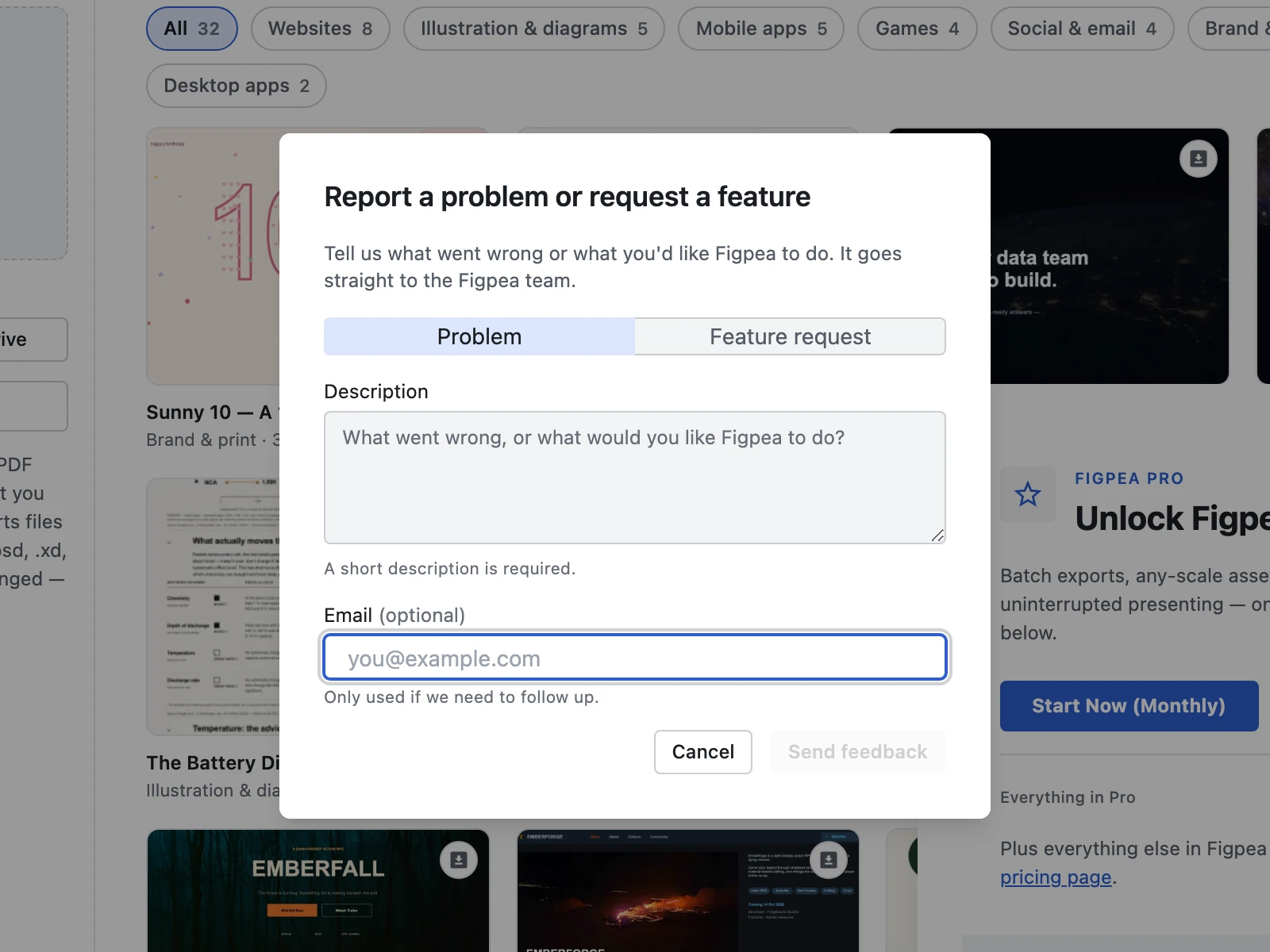
From the Help entry on the welcome screen and in the editor menu you can open a single feedback dialog with a Problem / Feature-request picker, a description field (required), and an email field (optional; pre-filled with your account email when you are signed in, editable, and you may clear it). Sending is strictly voluntary and explicit — nothing is sent until you choose Send feedback.
What feedback contains
When you explicitly send feedback, the following data — and nothing else — is transmitted to our backend:
- Report reason: the picker value (
feedback-problemorfeedback-feature-request). - Description text: exactly what you typed. No design-file bytes, no file name — description text only.
- Contact email: only if you provided one, used strictly for human follow-up on your feedback.
Retention & storage posture
- Storage: feedback travels the existing report path to the support inbox at
[email protected]. No design file is uploaded, so no object is stored in Cloudflare R2. - Retention: feedback lives only as inbox email. There is no file object to delete; to have your feedback email (including any reply-to address) removed, email
[email protected]. - Analytics isolation: feedback report data — including descriptions and reply-to email addresses — is strictly isolated from analytics. It is never sent to Google Analytics 4, Vercel Analytics, or any third-party tracking system. Only the
report_submittedevent row above is analytics.