 Figpea
Developer Handoff in Figpea: Export Design Specs & Tokens
Every designer who has handed off a file knows the moment a developer opens a link and it's dead. An XD spec link stops resolving weeks after a subscription lapses. Avocode's entire workspace disappeared in 2023. Sharing a raw .fig file means asking a contractor to create an account just to read a font size. Figpea's answer to developer handoff is built around a file, not a hosted service: open your XD, PSD, or .fig file in Figpea, then export a self-contained spec bundle and a design tokens package your developer can use with no accounts and no uploads.
If you're coming from Adobe XD's sunset, start with how to open XD files without Adobe XD — this guide picks up right where that one leaves off, once you're ready to hand the design to someone else.
The two handoff artifacts
Figpea ships two Pro exports built specifically for design-to-code handoff:
- An offline spec bundle — one HTML file covering every artboard, with click-to-inspect sizing and copyable CSS.
- A design tokens export — CSS custom properties (CSS variables) and a matching tokens JSON, built from your project's fills and text styles.
Inspecting a layer and copying CSS from it directly inside the editor stays free — that's the Inspect Tool. The two artifacts above take that same information and package it into files a developer can use without ever opening Figpea.
Export an offline spec bundle (Pro)
Open your file in Figpea — XD, PSD, .fig, and SVG all work, with Figpea's strongest fidelity on XD files. Free in-editor inspection lets you click any layer first and read its size, position, color, and font before you export anything. When you're ready to hand off, open Project Export and choose Spec Bundle from the format dropdown.
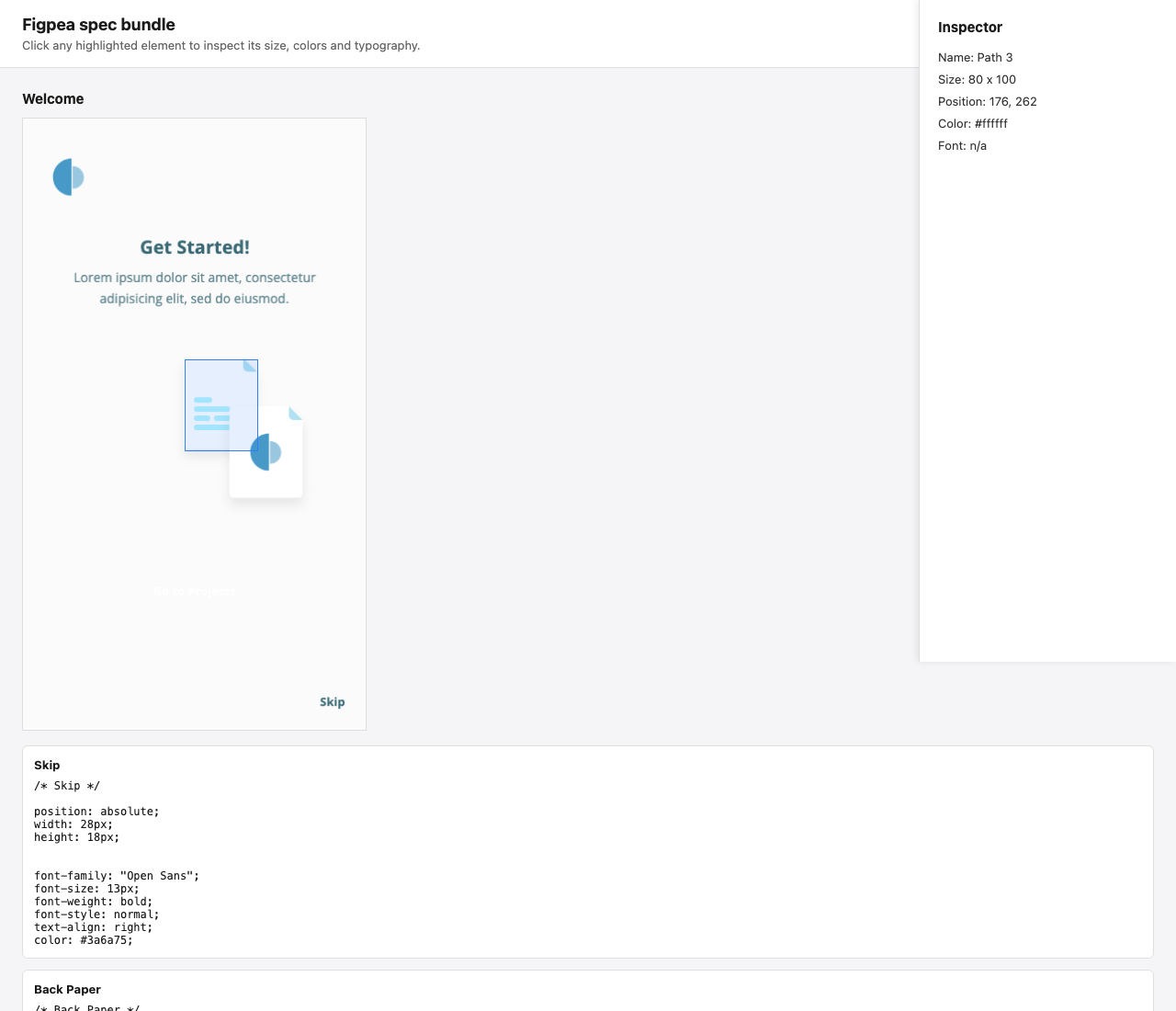
Think of it as an offline spec file — everything a developer needs, in one download. It opens straight from a downloads folder over a local file:// address, with zero network requests: no server, no upload, and no account for whoever opens it. That makes it safe for NDA work and client handoff alike. Inside, your developer clicks any pinned element to see its exact size, position, color, and font, then copies the CSS straight out of the panel — no guessing pixel values from a screenshot.
Export design tokens (CSS variables + JSON) (Pro)
The second handoff artifact exports design tokens: a CSS custom properties file plus a matching tokens JSON, built from the distinct fill colors and text styles already used across your project. Export it from the same Project Export dialog by choosing Design Tokens from the format dropdown.
Drop the CSS file into a codebase and reference var(--color-primary) instead of a hardcoded hex value. Feed the JSON file into a build pipeline or whatever tokens tooling your team already runs. To be precise about what you're getting: this is a documented subset, the fills and text styles Figpea can identify in your project, not a claim of full design-tokens-spec compliance. It's built to be genuinely useful in a real codebase.
What stays free: in-editor inspect
Not ready to export anything? You don't have to be. Selecting a layer and reading its size, spacing, color, and font directly in the Figpea editor is free, and lets you inspect design specs any time without exporting a single file — see the full walkthrough in the Inspect Tool guide.
Free in-editor inspection covers the same measurements the exports capture. The spec bundle and design tokens above simply package that information into files your developer can use without Figpea open at all — which is exactly why they're Pro exports (see Pricing for the current plans). Read the full reference on the Exporting docs page.
Why a file, not a hosted link
XD's shareable spec links show what happens when the handoff artifact lives on someone else's server: the link works today, and it dies whenever a subscription lapses, a team gets offboarded, or a service shuts down, the way Avocode did in 2023. A file has none of those failure modes. The Figpea spec bundle and design tokens export are downloads — once you have them, they're yours. Keep them in the repo, attach them to a ticket, or hand them to a contractor who doesn't have, and doesn't need, a Figpea account. If the file is under NDA, that's the whole point: opening the spec bundle touches no network, so nothing about your design touches a server you don't control.
These sit alongside Figpea's other export options — see Export Project and Export Layers for everything else you can export from a project.
Frequently asked questions
How do I hand off an XD design to a developer without Adobe XD?
Open the .xd file in Figpea, then export a spec bundle from Project Export. Your developer opens the resulting HTML file directly, with no Adobe XD, no Adobe account, and no dead spec link involved.
Can I export design tokens from an XD or PSD file?
Yes. The design tokens export works the same way regardless of source format. Open an XD, PSD, or .fig file in Figpea and export CSS custom properties plus a tokens JSON from Project Export.
Does the spec file work offline?
Yes. The spec bundle is a single HTML file that opens straight from a downloads folder over a local file:// address, with zero network requests once it's exported.
Is developer handoff free in Figpea?
Inspecting a layer and copying its CSS in the editor is free. The exportable spec bundle and design tokens are Pro — see Pricing for the current plans.
Can my developer open it without an account?
Yes. The spec bundle is a plain HTML file, so there's no account to create and nothing to install on their end.
Try it
Open an XD, PSD, or .fig file directly in Figpea to look around — no install and no account required just to browse. If you arrived here from an XD file with a dead spec link, the XD rescue guide walks through the complete rescue flow, spec bundle and design tokens included. When you're ready to unlock the handoff exports, Pricing has the current plans.