 Figpea
Rescue an Adobe XD File
Figpea is the highest-fidelity XD viewer anywhere — opening your orphaned .xd files for free, inspecting every layer and asset, and recovering what matters. If you have a .xd file without a copy of Adobe XD, or a project that needs to move forward, this guide walks you through the entire rescue workflow.
Open or import your .xd (Free)
The first step is to get your .xd file into Figpea. You don't need an account or any special setup.
- Drag and drop the
.xdfile onto the Figpea editor, or use File → Open in the menu. - Processing happens 100% locally on your machine — nothing is uploaded to the cloud.
- No sign-in is required.
If you have multiple files or want to batch-process several projects, the drag-and-drop approach is the fastest. For more details on how opening works across all supported formats, see Opening Design Files.
The XD health report (Free)
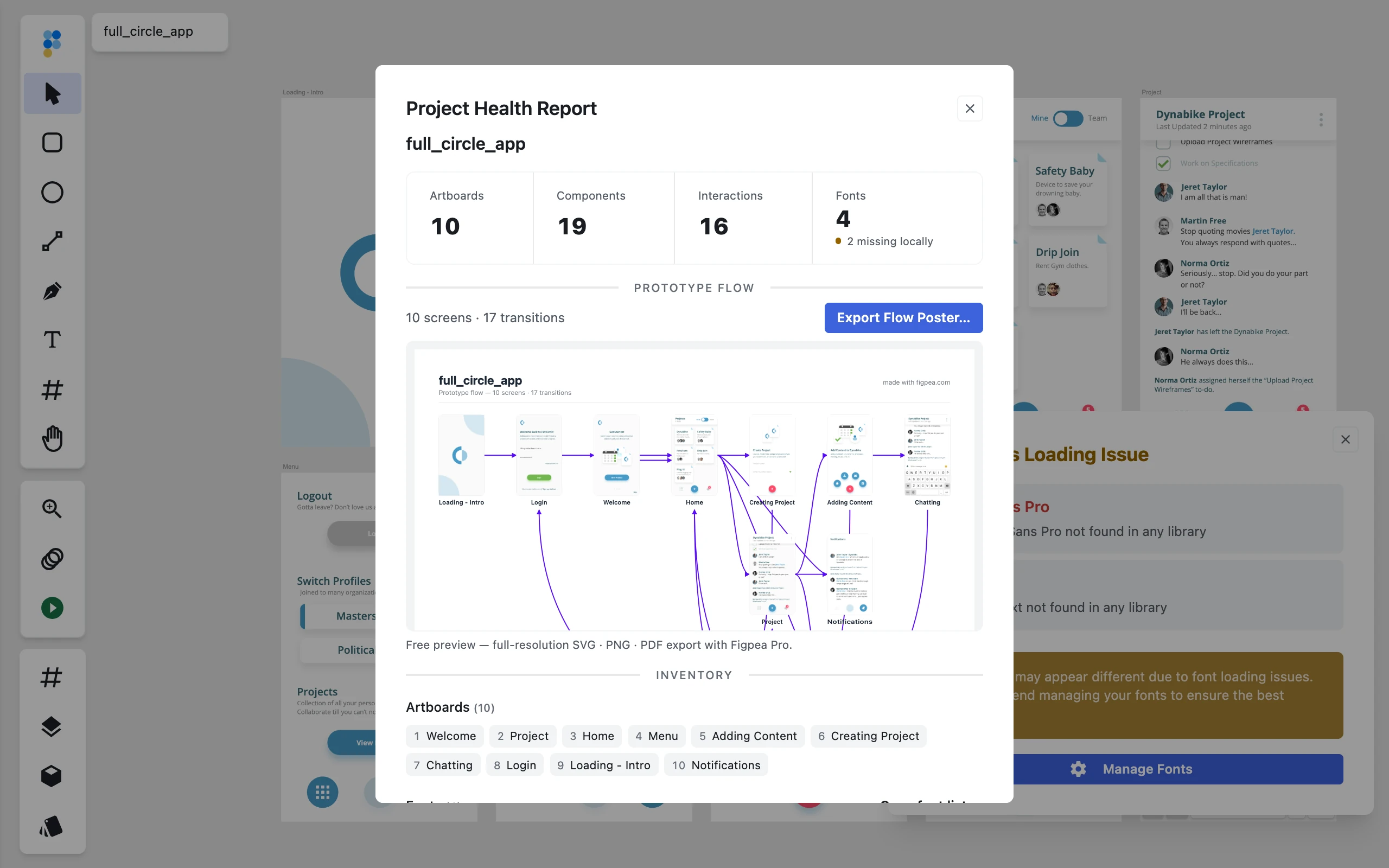
When you open your .xd file, Figpea scans it and generates a free health report — a snapshot of what's inside, designed to help you decide what to do next.
The health report shows:
- Artboard count and names — how many artboards and what they're called, so you know the scope of your file.
- Component inventory — the number of components and overrides, helping you understand reuse and complexity.
- Font list and substitution status — every font in the file, whether it's available locally or can be matched to a Google Font.
- Embedded images — count and total byte size of images baked into the file, so you know what's there.
- Interaction and animation count — prototyping elements, so you can plan your export strategy.
- Import issues — conditional breakdown of decode-time degradations, clearly distinguishing between approximated content (yellow warning dot) and missing content (red alert icon).
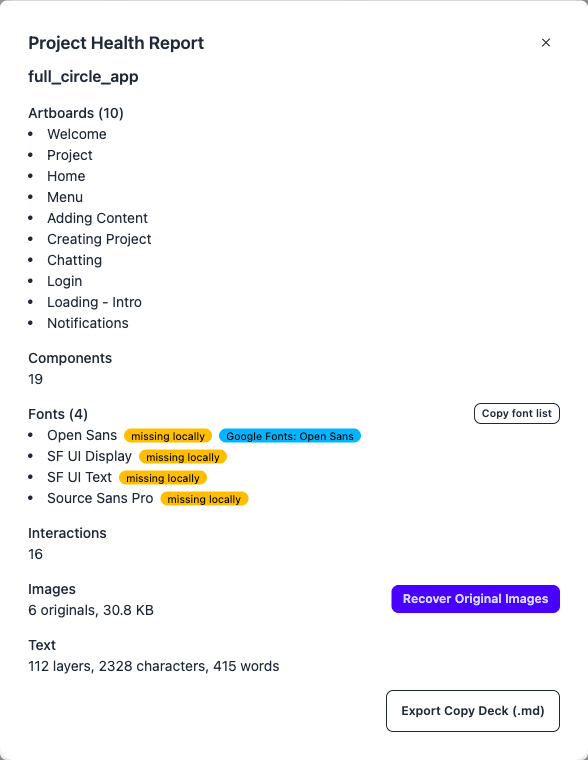
The report is free with no account required. You get a Markdown copy of the entire report to save or share, and a complete font manifest you can download. This is your decision point: does the file have what you need, were any features approximated or missing, and how big is the recovery effort?
Harvest assets with platform presets (Pro)
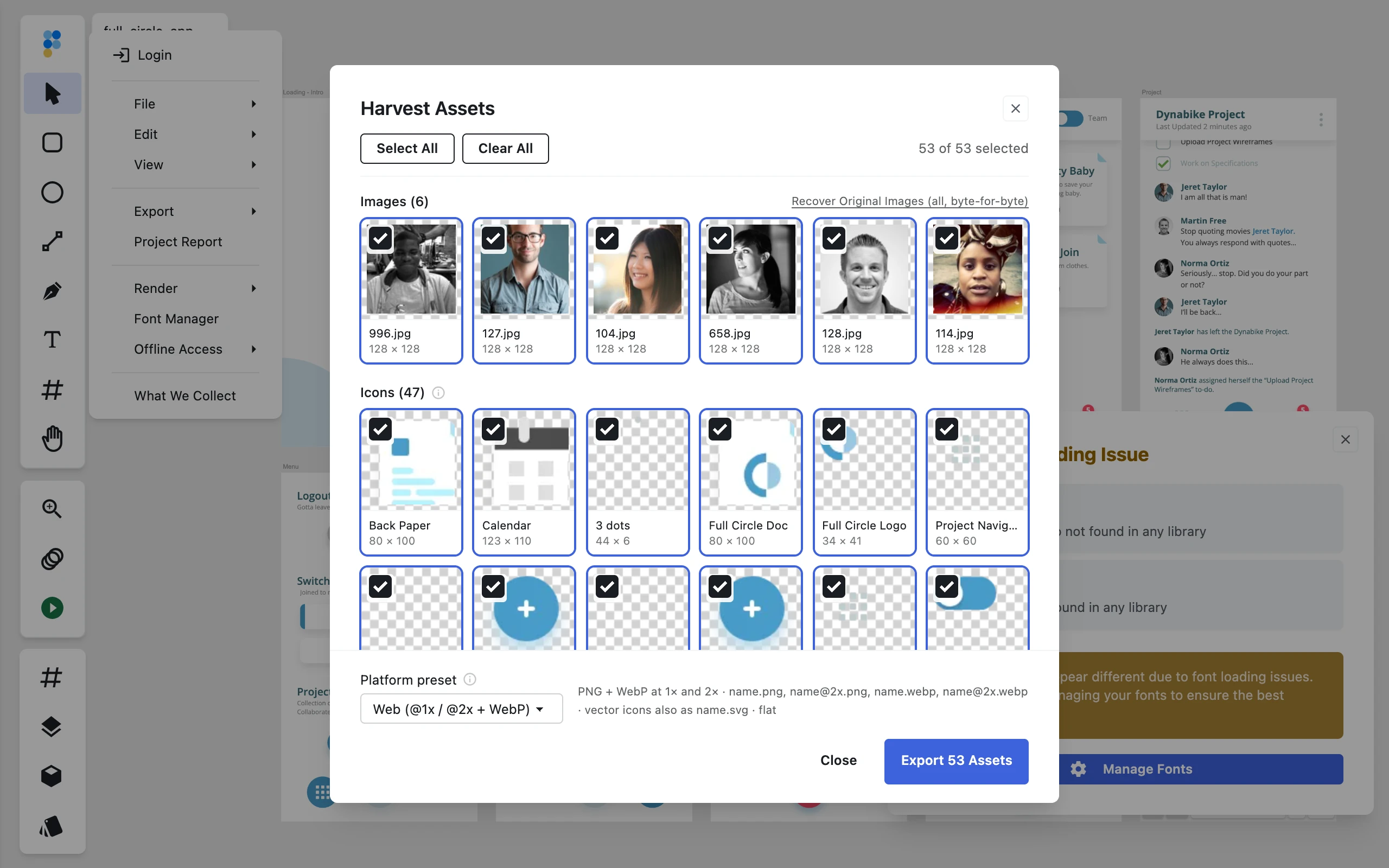
When the file is open, choose Harvest Assets under Export. The gallery collects everything exportable into two sections — Images for embedded rasters and Icons for icon-sized vector-only groups — and Figpea scans for both mechanically: embedded image fills plus vector groups whose longest side is 128 px or smaller, with no text and no embedded images inside. Full artboards are never listed.
Tiles arrive pre-selected. Use Select All or Clear All to reset the set, switch presets freely, and watch the live count on the Export N Assets button. The download is a ZIP named <project>-assets-<preset>.zip. Browsing the gallery — sections, selection, preset switching — is free; batch export is Pro, with a subscription or a Rescue Pass.
How the gallery works
Images holds every embedded raster in the file. Icons holds the vector-only groups described above — small, text-free, image-free. That split is mechanical: size and content checks, nothing more.
Preset renders are re-encoded at each scale you ask for. When the untouched bytes matter, use Recover Original Images below, which pulls each raster out byte-for-byte in its original format.
Web, iOS, and Android presets
Web is the default: PNG plus WebP at 1x and 2x (name.png, [email protected], name.webp, [email protected]), with icons also rendered as flat .svg files.
iOS renders PNG at 1x, 2x, and @3x, flat, with icons also rendered as flat .svg files.
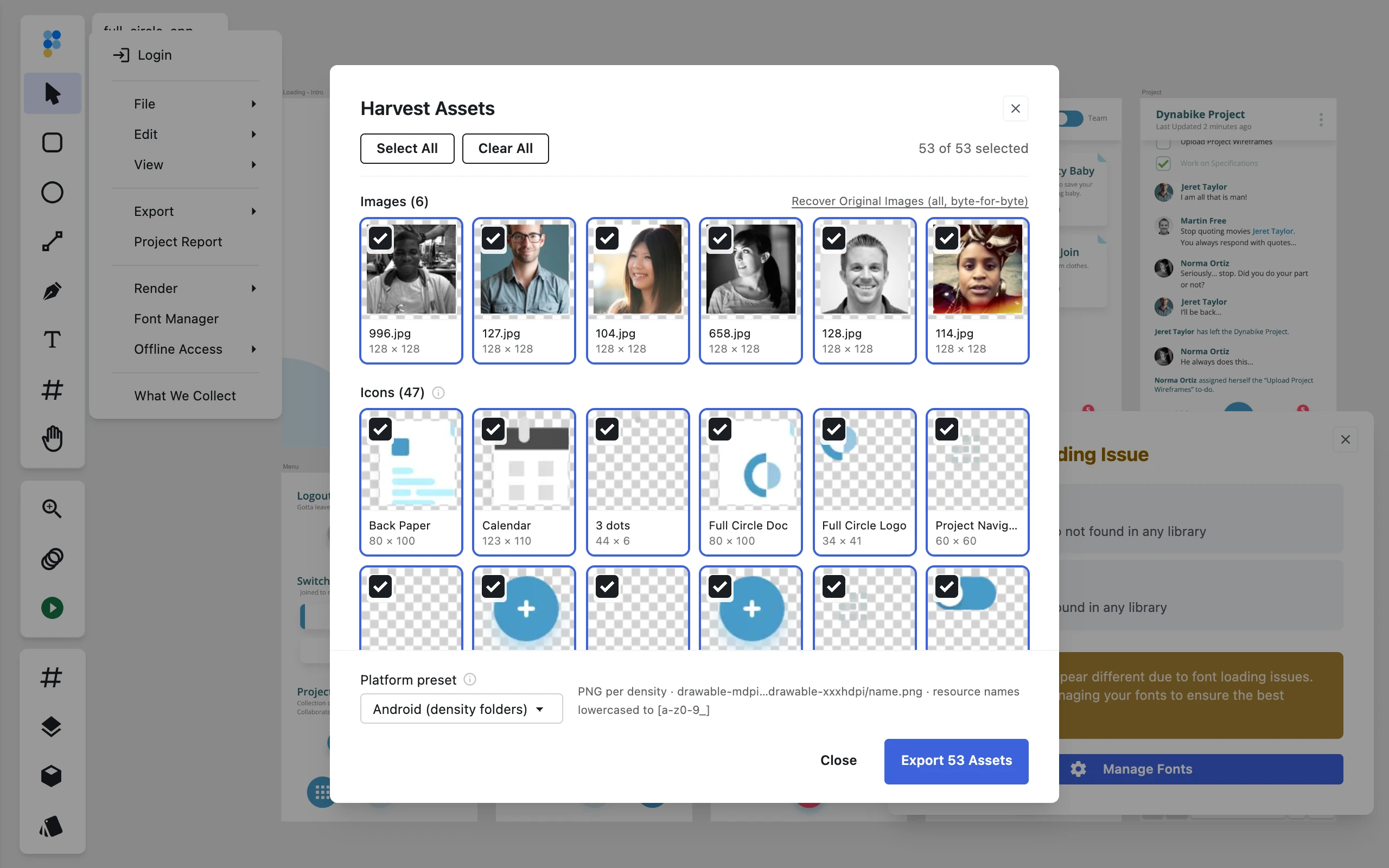
Android renders PNG into density folders from drawable-mdpi through drawable-xxxhdpi, with file names sanitized to lowercase [a-z0-9_] — "Icon Home@Large" becomes icon_home_large. Android ships PNG only, with no SVG in this preset, so every drawable- folder holds density PNGs and nothing else.
Recover original images (Pro)
If your .xd file contains embedded images — photos, logos, or assets baked into the artboards — Figpea can recover them. This is a Pro feature.
Original-image recovery works at the byte-for-byte, no re-encoding level. Figpea extracts each image in its original format and resolution, so a photo compressed as JPEG stays JPEG, and a PNG stays PNG at its original size. You get back exactly what was baked into the file.
To unlock original-image recovery, see Figpea Plans and Pricing. The Rescue Pass is built for exactly this: a one-time payment that unlocks 7 days of full Pro access, with no recurring subscription. Pay once, recover your images, and you're done.
Archive the project: contact sheet and flow poster (Pro)
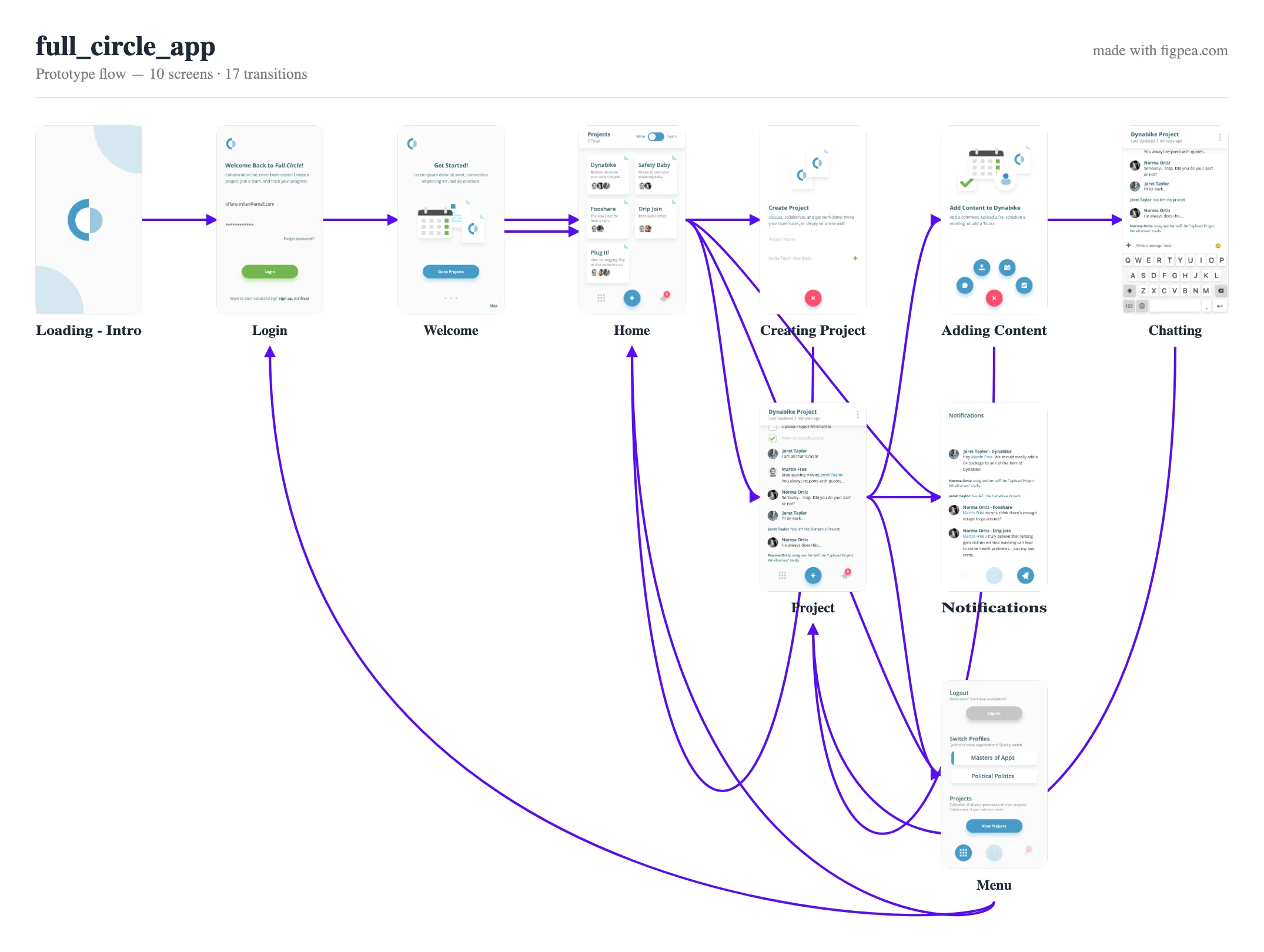
Two one-click records ride the same Pro export, with a subscription or a Rescue Pass: a contact-sheet PDF of every artboard and a flow poster map of the prototype. Both are flat records of the file as opened — each is not a recovered project file, just a picture of it, and neither is editable design content.
Contact-sheet PDF
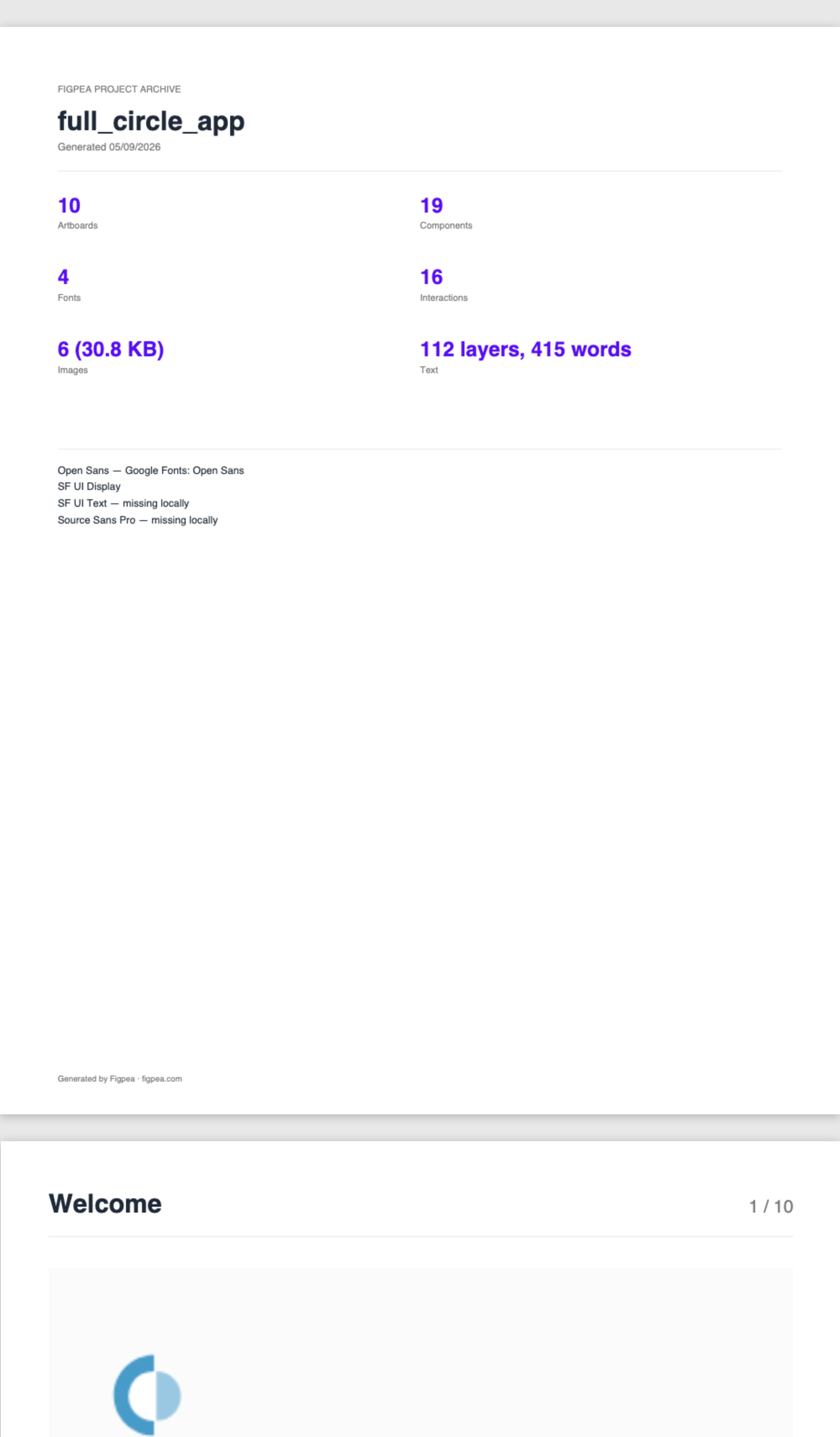
The export builds <project>-contact-sheet.pdf: a cover page with the project name and artboard counts, then one titled page per artboard in document order. It is a flat PDF record for filing and sign-off, nothing more.
Flow poster (SVG, PNG, or PDF)
The poster draws one node per artboard — thumbnail plus name — and one edge per prototype transition, named <project>-flow-poster with your pick of SVG, PNG, or PDF. Hyperlinks, back-navigation actions, and same-artboard loops draw no edge: only a real transition between two different artboards becomes a line. The result is a static picture, never playable — nobody can click through it.
Free flow preview in the health report
If the file carries at least one transition, the health report embeds a free inline flow preview: the same screens-and-edges map at small size, unwatermarked, so you can confirm the flow before paying. Files with no transitions show no preview — there is nothing to map.
Hand off to a developer (Pro)
If your XD project needs to go to a developer — whether for implementation, handoff, or further design work in another tool — Figpea Pro includes two developer-handoff exports: a self-contained spec bundle and a design tokens package.
This is a Pro feature. The spec bundle is a single offline HTML file covering every artboard — it opens straight from a downloads folder with zero network requests, and your developer clicks any element to read its size, position, color, and font, then copies the CSS straight out of the panel. The design tokens export emits CSS custom properties plus a matching tokens JSON for your project's distinct fill colors and text styles.
For the full details on the developer-handoff format and how to use it, see Developer Handoff in Figpea and Exporting.
Moving to Figma?
If you're migrating your design from XD to Figma, Figpea can help with the first step: exporting your .xd artboards as high-fidelity, Figma-tuned SVG. Try it free on a single artboard to prove fidelity; the full Figma Migration Kit — every artboard, plus fonts, copy deck, and original assets — is part of Figpea Pro and the Rescue Pass.
Figma's native import process is an SVG-import migration, not a native .fig conversion — you're bringing in vector content and assets, not the original Figma file structure. That's by design: it gives you a clean start in Figma and avoids the friction of trying to recreate the original .fig in a tool that wasn't designed for XD workflows.
See Import Adobe XD into Figma for a step-by-step walkthrough.
What's free vs Pro
Free (no account required):
- Open and view a
.xdfile - Generate a health report (including artboards, components, fonts, images, interactions, and import issues)
- Export the health report as Markdown
- Export the font manifest
- Export a single asset (PNG, WebP, or SVG) at 1x
- Browse the harvest gallery — sections, selection, and preset switching — free
- See the inline flow preview in the health report when the file carries at least one transition
Pro (subscription or Rescue Pass):
- Recover original images byte-for-byte
- Developer-handoff spec bundle and design tokens
- Export at any scale and in batch, including SVG and PDF
- Harvest batch export to a ZIP named
<name>-assets-<preset>.zip(Pro subscription or Rescue Pass) - Contact-sheet PDF of every artboard in document order (Pro subscription or Rescue Pass)
- Flow poster in SVG, PNG, or PDF (Pro subscription or Rescue Pass)
The Rescue Pass is a one-time payment that unlocks 7 days of full Pro access — no recurring subscription.
Everything you need to open, inspect, and decide what to do with your .xd file is free with no account. Export at any scale (including any-scale SVG), batch export, PDF export, original-image recovery, and developer handoff are Pro features. A single 1x export (PNG, WebP, or SVG) is free on every plan. See Plans for details.
Related docs
- Figpea XD Rescue — the XD-rescue landing page and entry point
- Opening Design Files — how opening and privacy work across all supported formats
- Exporting — the full export reference and formats
- Developer Handoff in Figpea — spec bundles and design tokens
- Plans & Pro — what's free vs Pro, and the Rescue Pass
- Pricing — current plan pricing
- How to Rescue an Adobe XD File — the complete how-to walkthrough
- Import Adobe XD into Figma — migrating to Figma
- Exporting — asset-harvest presets and batch-export reference
- Opening Design Files — how XD opening works, processed locally on your machine