 Figpea
What's New in Figpea v5.3.0: Figma Charts That Render Like Figma, Photoshop Adjustment Layers and Smart Objects, and the Whole Viewing Path on a Phone
Figpea opens design files — Adobe XD, Photoshop (PSD/PSB), SVG, PDF, Figma and more — right in your browser. Nothing installs, nothing uploads, and you don't need an account just to look at a file. Your original file is never changed; Figpea only ever creates new files.
This release is mostly about fidelity, and it comes from a method rather than a hunch: we opened a large, real Figma community file next to its own reference images and compared them card by card. That produced a list of twelve distinct render defects, each one filed, reproduced and fixed on its own — including one we caused ourselves and caught at the last minute, which is in the list below rather than left out of it. Photoshop got the same treatment from the other direction, and turned up two entire classes of document content Figpea was not decoding at all: adjustment layers, and smart objects.
Outside fidelity, the headline is that the whole viewing path now works on a phone — zoom, pan, pages, layer properties, presentation, and sharing a layer — and the welcome screen has become a real full-window dashboard. There's no breaking change in this release; nothing you scripted against 5.2 stops working.
Figma: twelve render defects on one real file
Every one of these was found by comparing Figpea's render of fullchartscomponent.fig against the file's own reference images, and every one is a separate fix with its own regression test.
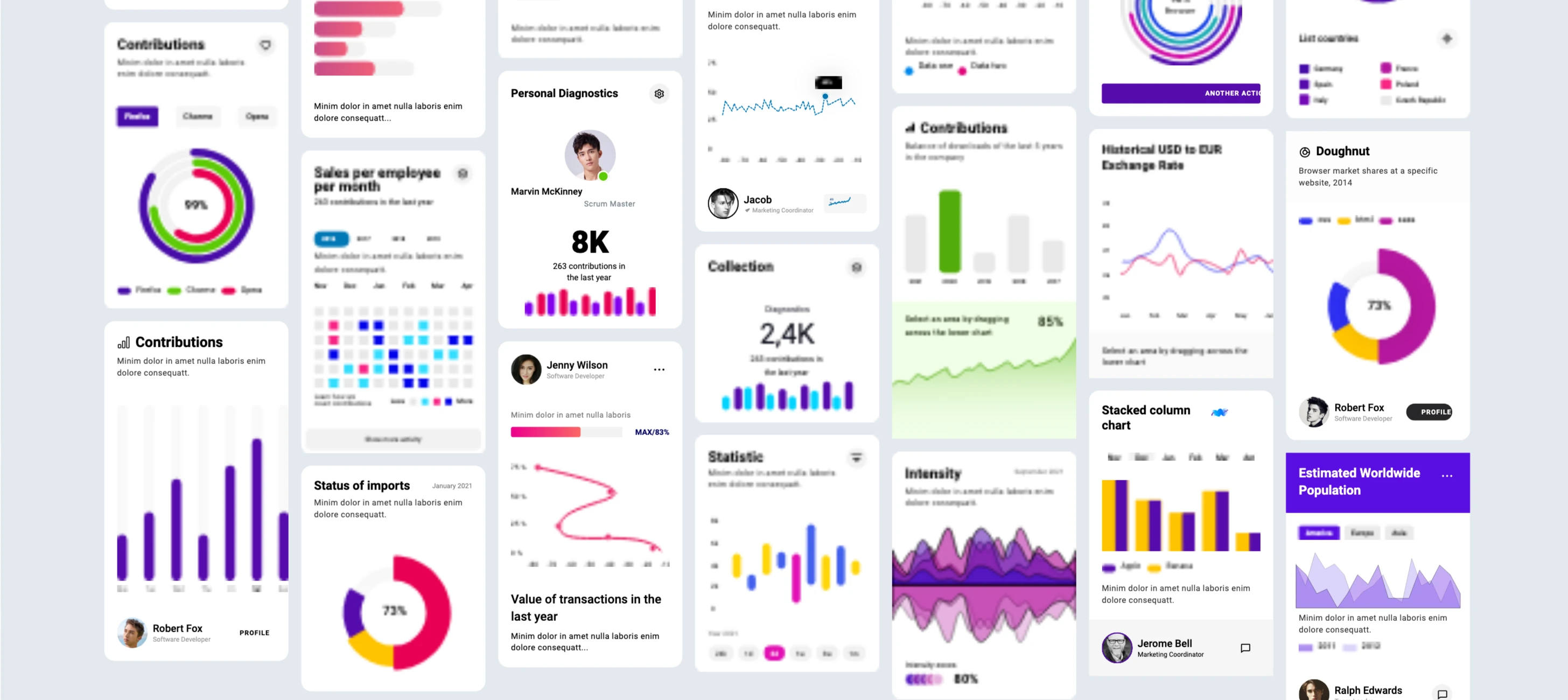
- Donut and ring charts were solid discs. A partial arc lost its sweep, its caps and its inner hole, so the 77% storage donut rendered as one filled circle with its centre label buried underneath. Segmented rings collapsed to a single full ring in one segment's colour. Arcs now draw as arcs, with their sweep, their caps and their hole.
- The 99% ring's outer contour was a visible octagon. It's a circle now, with no straight-edge facets at 1:1.
- Gradient and glow strokes painted solid black, the wrong colour, or nothing at all. On light artboards a blue-to-magenta band rendered black; on the dark artboard an entire line chart rendered as empty space; a neon-yellow glow line came out cyan. Fixed in two steps — first a safe colour drawn from the gradient's own stops, then (see the next section) real gradient stroke paint.
- Two-line headings stamped both lines at the same height. "Atmosphere Temperature by Altitude" rendered as overlapped glyph soup. The lines now occupy separate rows.
- Some embedded avatar photos decoded as blocky noise while others in the same file were perfect. Nine avatars, three separate causes — a pattern-fill decode-scale cap, an override target missing from the parsed document, and images baked into a component definition — all three now resolved.
- Instance colour overrides were still being lost on non-chart elements. Pie slices recoloured and rotated, dark-theme rows kept the master's white fill (making white name text invisible on it), legend swatches vanished, and a contribution grid dropped its leading placeholder cells and shifted. Those are back.
- Dashed rules and hairline gridlines were not drawn at all — a card's dashed
MAXceiling line, a chart's dashed level rules, the faint 1px gridlines behind many charts. All three now render at 1:1: dash patterns are decoded and drawn, and a sub-pixel-wide stroke no longer rounds down to zero width and disappear. They are faint by design, so a zoomed-out view like the image above won't resolve them — the fix is checked against exported pixels at 1:1, not by eye. - A layer's resolved fill changed between draw passes. Reading a style value off a shared component master mutated that shared object in place, so one instance's read could change what a sibling instance resolved next. A read no longer mutates anything shared.
- Stroke-only open paths on component instances rendered as filled blobs. This one was a regression we introduced ourselves earlier in this cycle: the fix for donut arcs treated "has stroke geometry, has no fill geometry" as "this outline is already a fill", which is also the signature of every ordinary open polyline — so line charts got flooded with colour under the line. An instance is now stroke-as-fill if and only if its master is.
- A LINE child overridden inside a component instance had an identity transform baked onto it, displacing it by 176–220 units on two corpus files.
- The concentric rings were painted the wrong colour — the last defect found in this batch, and the one that most nearly shipped. The 99% "Contributions" ring and its two siblings rendered in their resolved stroke colour instead of the fill colour the source uses, so the arcs came out navy, blue and cyan while the card's own legend swatches, resolving correctly, read violet, green and red. The same card displayed two different answers for the same three series. This was self-inflicted, and specifically by the stroke rework described in the next section: two places in the
.figdecoder mark a shape as "this outline is really a fill", and both cleared the old single-stroke flag without also clearing the new ordered stroke list that replaced it — and the list is what gets read. Both now write the two representations together, so a shape that carries no stroke says so consistently. The arcs match their legend in the image above. The fix is verified against sampled pixels at 1:1 rather than by eye — each ring's dominant colour has to match that ring's own fill and not the stale stroke value, so the test fails if this ever regresses.
What is still not right, stated plainly. This is one large, real community file measured against its own reference images, and it is not pixel-identical — we are not claiming it is. Two limits named elsewhere in this post apply here directly: the soft "glow" stroke treatment on this file is an effects concern that stroke paint does not address, and a Figma grid auto-layout frame is recorded as a warning rather than described as something it isn't. figpea.report.diagnostics() is the honest account of what Figpea knows it degraded on any file you open — and it is worth reading its own caveat, which is that the coverage reflects which degradation paths are wired to report, not which formats render worse.
Strokes: more than one, and painted with a gradient
Until now a layer had exactly one stroke, and its colour was a single flat colour string. A gradient-painted border could not be represented at all — only approximated.
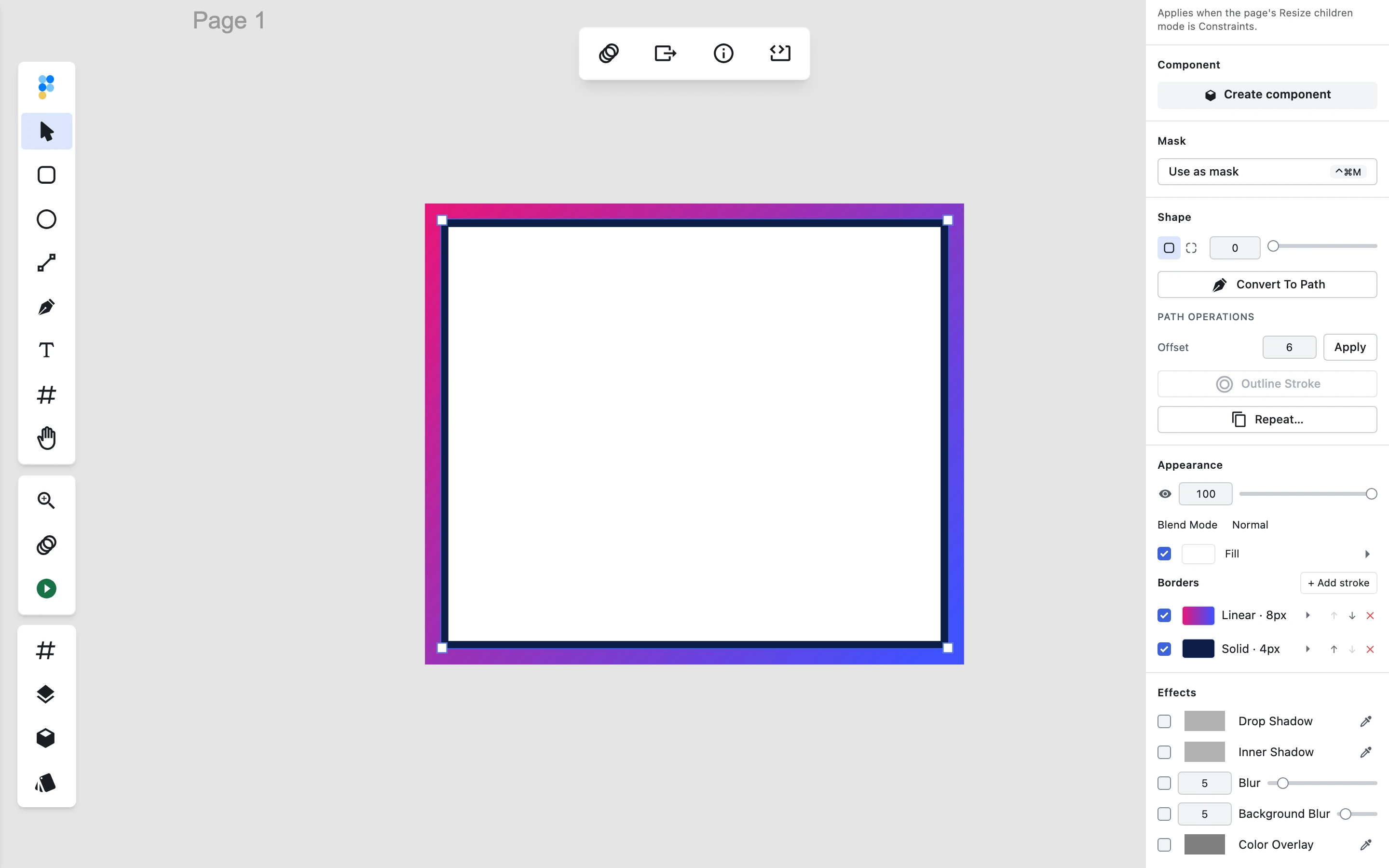
A stroke is now an ordered list, and each entry carries its own paint — solid, gradient or image — alongside its width, position, cap, join and dash. They draw stacked in order. The Borders section of the inspector adds, removes, reorders and enables each one and switches its paint type, and window.figpea's stroke surface reads and writes the whole list.
The Figma decoder consumes gradient stroke paint end to end, so a gradient border arrives as a true multi-stop gradient — the full stop list, with each stop's colour and position, survives into the layer model instead of collapsing to one colour derived from the stops. That retires the interim fallback described above: rasterized_fallback stops being reported for the stroke paints Figpea can now represent faithfully, and stays for the ones it can't.
Two honest limits: per-text-run strokes and variable-width/tapered strokes are not part of this, and the soft "glow" stroke treatment on that same Figma file is an effects concern rather than stroke paint, so it isn't either.
The stroke rows themselves were also brought back onto the design spec — a wider swatch, and a flat single-line row instead of a bordered card.
Photoshop: adjustment layers
A Photoshop adjustment layer is a layer whose content is a colour transform applied to everything beneath it. Figpea did not decode them at all — they simply weren't in the document.
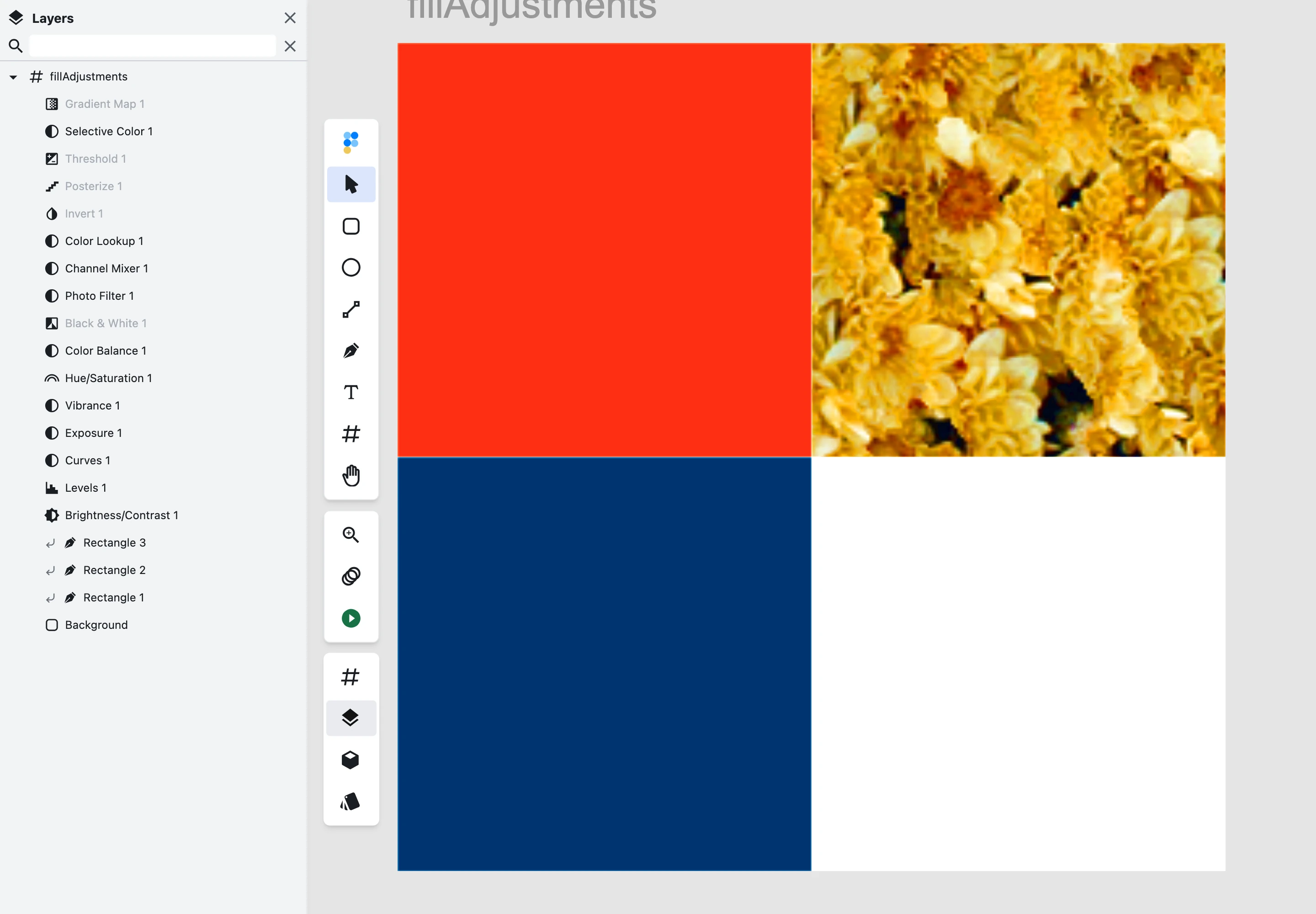
Eight types now decode and render: Brightness/Contrast, Levels, Hue/Saturation, Black & White, Threshold, Posterize, Invert and Gradient Map. Each is applied to the composited backdrop within its real scope — document-wide, clipped to the layer directly below it, or confined to its own group — and modulated by its layer mask if it has one. Each appears in the layer panel with its type, is selectable, and can be hidden; hiding it removes its effect.
The other eight adjustment types Photoshop defines (Curves, Color Lookup, Selective Color, Channel Mixer, Photo Filter, Color Balance, Exposure and Vibrance) are not decoded yet. The document still opens, and a warning names the unsupported adjustment, rather than a silently wrong colour appearing. Two limits worth naming: Figpea does no ICC colour management, so adjustments operate in the working sRGB space like everything else; and for Hue/Saturation and Black & White the maths is Figpea's own model rather than measured Photoshop parity. This is import fidelity only — you can't author or edit an adjustment layer in Figpea.
A few more Photoshop fixes went with it:
- A gradient fill silently disappeared whenever one of its colour stops used a non-RGB colour model. The failure was caught internally, so nothing surfaced — the fill just degraded to "none" and the gradient wasn't there. Grayscale stops now decode to their equivalent grey.
- A malformed gradient colour stop crashed the decode outright. A stop with a missing colour entry threw while the gradient descriptor was being read, and the gradient fill was lost. This one came from our own error telemetry — eight occurrences on the live editor — rather than from a test. A missing stop now falls back to a default rather than throwing, and records a diagnostic naming what it substituted.
- Masked shapes were missing until you touched the canvas. Opening a PSD could finish its first render with some shapes unpainted; any pan or zoom painted them correctly and permanently. Nothing in the interface said the render was incomplete, so it read as a broken import. The invalidation chain that caused it is fixed.
- The last gap in last release's blend-mode compositor is closed. v5.2.0 shipped all 27 Photoshop blend modes through a real per-pixel compositor; one case remained wrong — a source pixel with partial alpha over a backdrop that is itself not opaque, where the backdrop was being composited twice. Those pixels now match the W3C compositing formula, so dragging a layer's opacity while it uses a non-native blend mode over a semi-transparent stack no longer produces a dark fringe part-way through.
Photoshop: smart objects are no longer just a flat picture
A smart object is Photoshop's way of placing one document inside another — an embedded source, plus a transform describing where and at what size it sits. It is not a niche feature: across our PSD corpus, 504 layers — 11% of every layer in it — carry placed or smart-object data.
Figpea decoded none of it. The blocks were sitting there in the file, the vendored parser could already read them, and the decoder never looked. What you got was the baked raster composite Photoshop leaves alongside the real content — so the placement transform, the embedded source document, and the fact that two placements of the same source are the same thing were all simply absent from the document Figpea built.
They are decoded now. A placed layer carries its placement transform and a reference to its decoded source; an embedded source is decoded once and shared, so two placements of one source resolve to the same decoded source rather than two independent copies. Where that source resolves to a plain image, the layer's fill points at the full-resolution source instead of the baked, display-scale bitmap — for one corpus file's logo placement, the image the draw actually resolves is the source's own 1024 × 768 rather than the 140 × 41 box the composite was baked into.
There is no screenshot for this section, and that is the honest reason: at 1:1 it looks the same. What changed is the document Figpea builds, not the picture it paints today. We would rather say that than stage a before-and-after that doesn't exist.
Which leads to the limit worth naming loudest, because it is the one you would otherwise assume: a scaled-down placement does not yet resolve at display resolution when you zoom in. That was the original goal of this work and it is not in this release. We measured it instead of asserting it, the measurement did not support the claim — a 400% capture came out far blurrier than a plain upscale of the same region — and rather than ship a change to the shared render path with nothing to show for it, we reverted that change and split the sharpness work into its own tracked item. The decoding is the foundation; the payoff is a separate release.
The rest of the boundary, stated once:
- Externally-linked smart objects whose source isn't inside the PSD are recorded as unresolvable — the document opens, the baked composite is used, and a warning names the layer.
- Non-affine warped placements fall back to the baked composite with a warning too. An honest degradation beats a confidently wrong transform.
- An embedded source that is itself a PSD is decoded recursively, but its rendered fill still comes from the baked composite; only flat-image sources get the full-resolution path described above.
- Recursion is capped at five levels of document-inside-document, and the total decoded embedded-source payload at 200 MiB; past either, further placements degrade to their baked composite and say so.
- Smart filters — adjustments attached to a smart object — are not decoded, and wait on the adjustment work above.
- This is import fidelity only. You can't edit a smart object's source in Figpea, and nothing writes smart objects back out on export. Figpea still never changes your original file.
Figpea on a phone
Reviewers are handed a design link and they are frequently on a phone. Until now the viewing path assumed a mouse and a wide window.
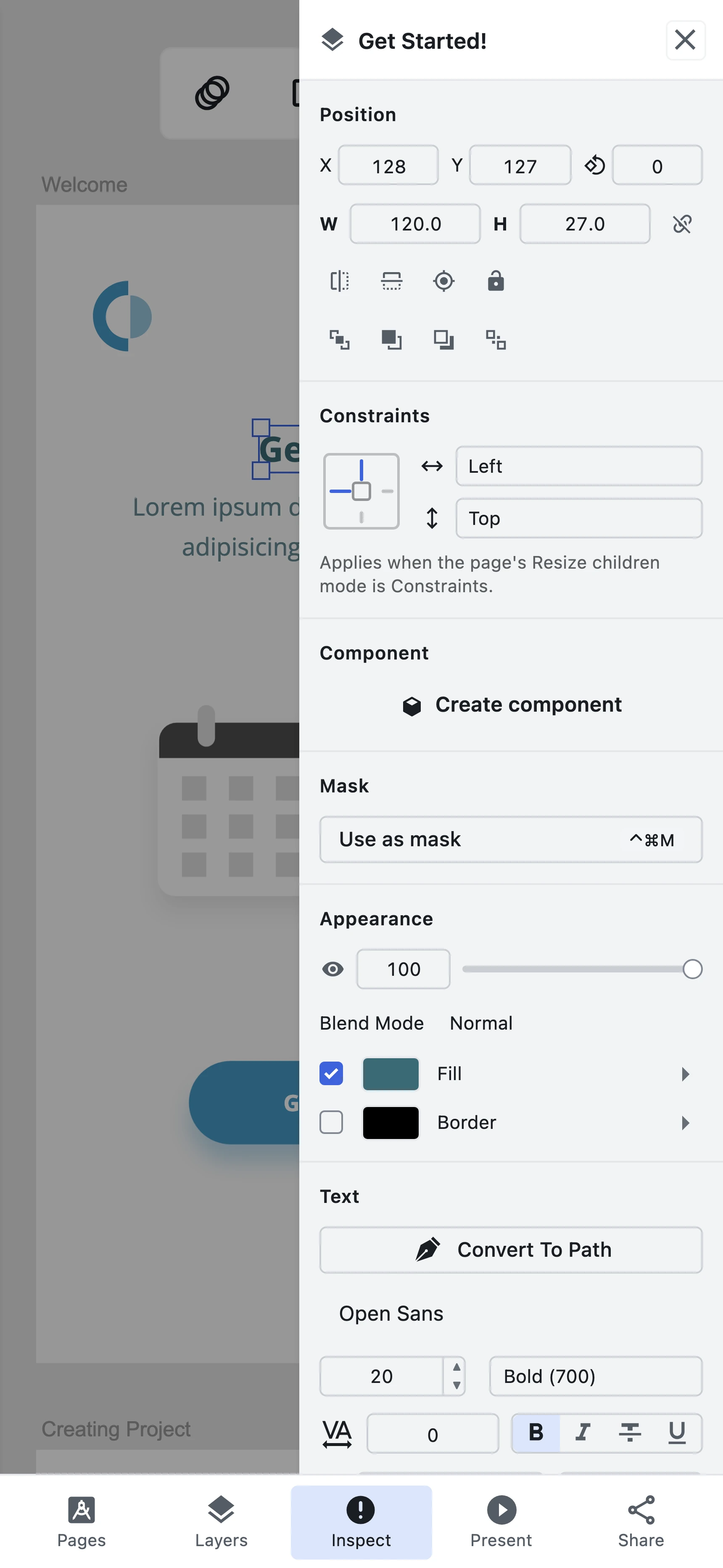
On a narrow touch viewport you can now pinch to zoom about the midpoint of the gesture and drag with one finger to pan, without the page scrolling or rubber-banding underneath you. The page/artboard list and the layer inspector are both reachable as drawers from a five-slot action bar, and the inspector's values read without horizontal scrolling or clipped content. Presentation fills the viewport and advances by tap, with the desktop chrome out of the way. And Share exports the selected layer as a PNG at 1× and hands it to the OS share sheet — with no upload, no account and no upgrade prompt — falling back to a download where the browser has no Web Share file support. ?loader=http deep links open on a phone too.
What this is not: authoring on mobile. Layer creation, drag-transform widgets, gradient and pattern editing, path operations and text editing stay desktop-only, deliberately. Comments and hosted link sharing aren't part of it either — the share above is strictly local. And a tablet is treated as a narrow desktop or a wide phone, not as its own breakpoint.
Opening from Google Drive on a phone is fixed too. On mobile Safari and Chrome-for-iOS the internal popup that starts the Drive flow was being opened too long after your tap for WebKit to still count it as user-initiated, so the first attempt failed. The provider code and Google's SDK now load in parallel from the moment you open the consent dialog, so the popup fires with no network wait folded into the click. A bounded timeout also means that if Google's picker fails to build a session at all, you get Figpea's own clear failure dialog instead of being stranded on Google's un-dismissible panel. One residual: Chrome-for-iOS also has a Google-side account-access gate that this fix does not claim to resolve.
There's a new Mobile Design Viewer & Touch Review Guide in the docs, and a how-to post on viewing design files on mobile.
A welcome screen that uses the whole window
The landing screen was a fixed-width card floating in the middle of an empty window, capped at 920px however large your display was.
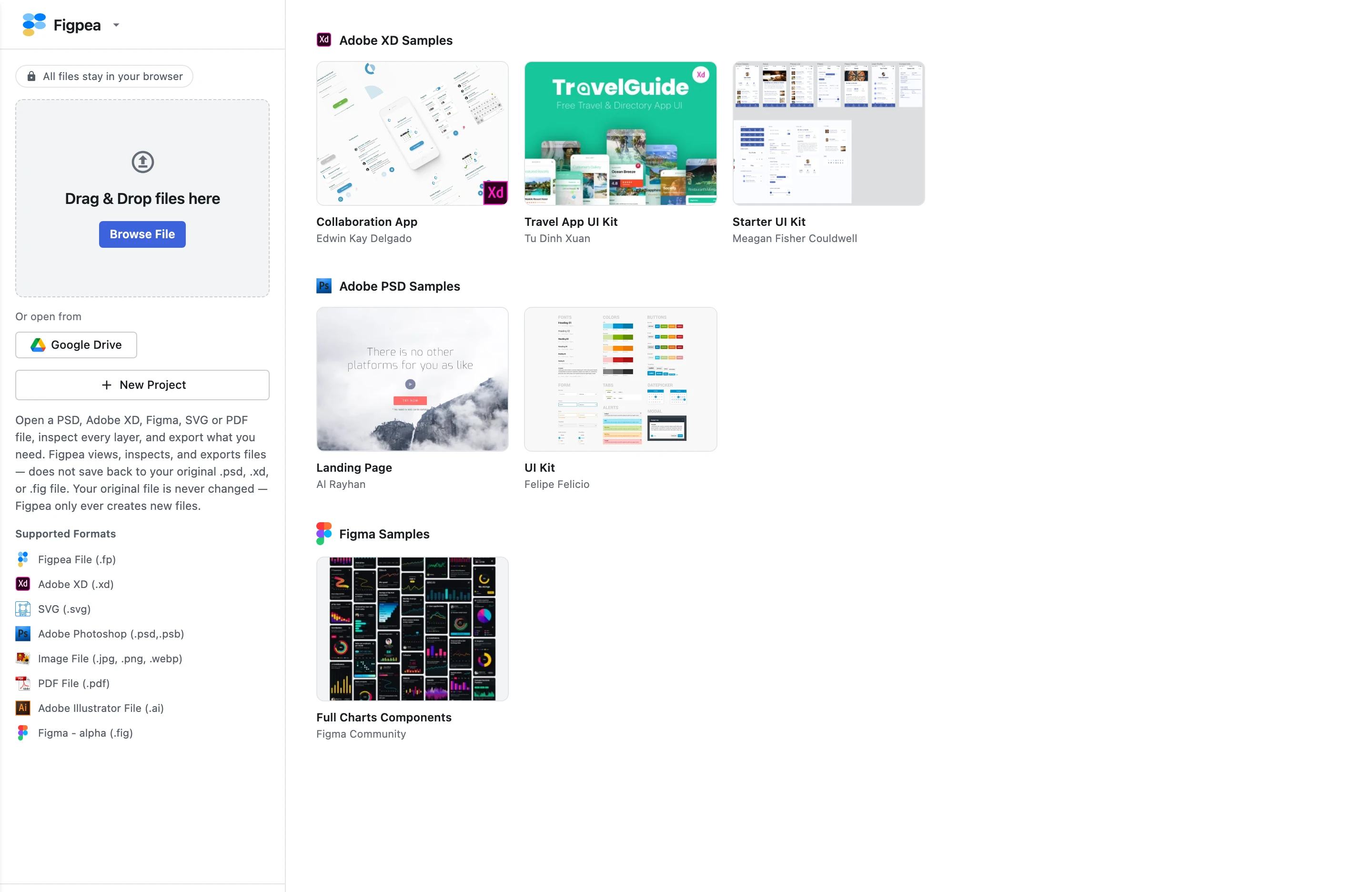
It's now a full-viewport frame: a fixed sidebar holding the brand and the primary actions — the drop target and Browse File, the cloud-open group, New Project — beside a content area that flexes to fill the rest of the width and lays the XD, PSD and Figma sample galleries out across it, with more columns on a wider display. Everything that used to live on the landing's footer bar now lives in the layout: the main menu (all of it, including What We Collect), the version switcher, the offline-availability status, the Documents and Blogs links, the support email, the Twitter/X link and the copyright year. Every control is reachable by keyboard with a visible focus ring, both themes are first-class, and it reflows from 480px to 1920px and beyond without overflow or clipping.
Nothing about it behaves differently. Same actions, same handlers, same outcomes, same content set — no recents, no templates, no upsell — and the privacy claim and the export-only disclosure carry over word for word. A follow-up fixed the one thing the new layout broke: the sidebar clipped the main menu's submenus, because a dropdown panel is positioned inside a container with overflow: hidden, and no z-index can escape a clip.
Repeat, previewed on the canvas before you commit
Repeat lays a shape out along a path, around a ring, or in a grid. Setting it up used to be a guess — you typed numbers, clicked Apply, looked, and undid.
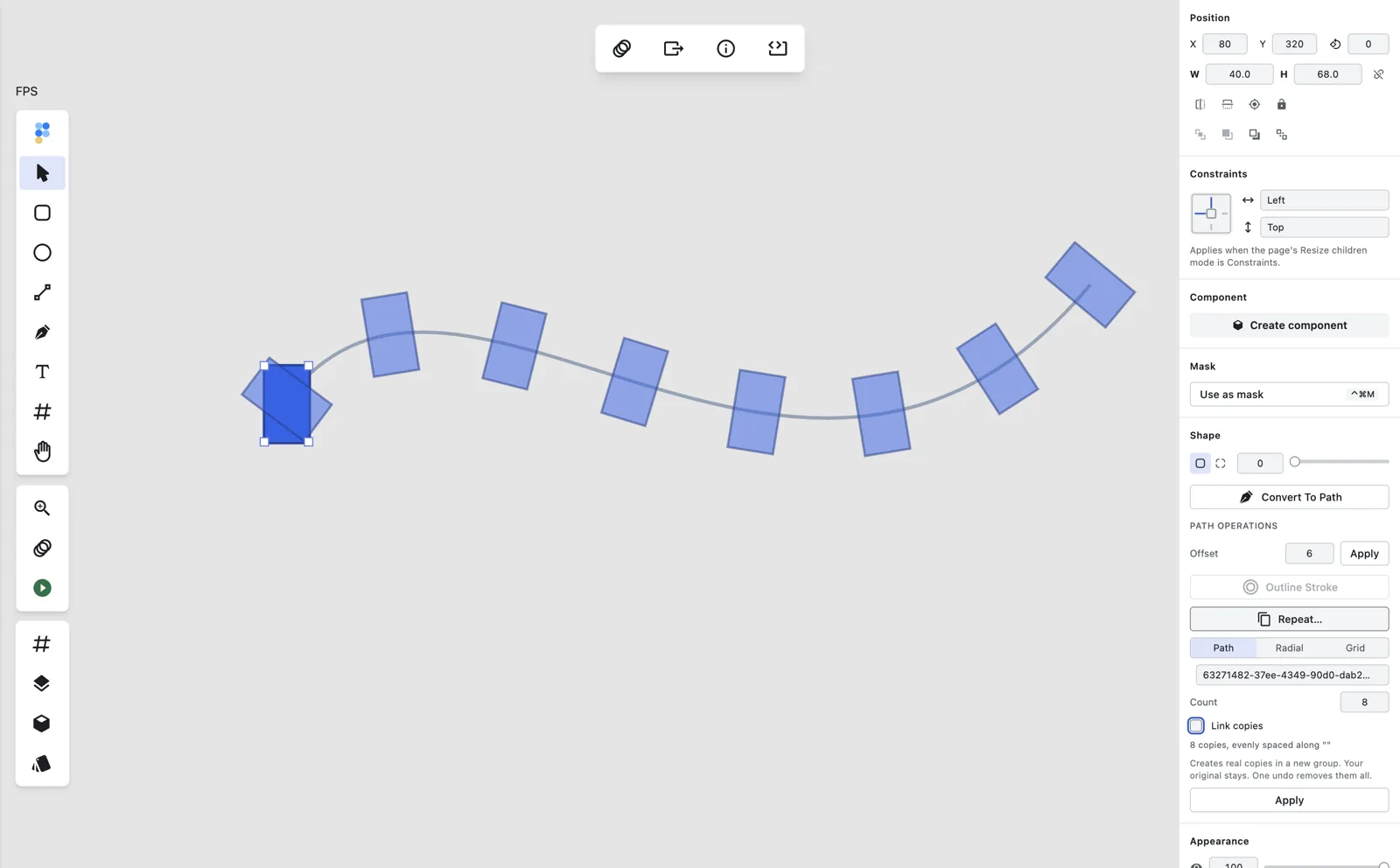
Open the Repeat… panel and translucent ghost copies of your shape appear on the canvas at the positions the current settings would produce, in all three modes. Change Count, pick a different guide path, or move any of the radial or grid parameters, and the ghosts follow immediately. They're drawn on a non-interactive overlay, so clicking or hovering over one passes straight through to whatever is underneath and your selection is untouched.
Nothing reaches the document until you press Apply — the preview is entirely transient, and collapsing the panel, changing your selection, or applying all clear it.
Pick a page size before you draw the page
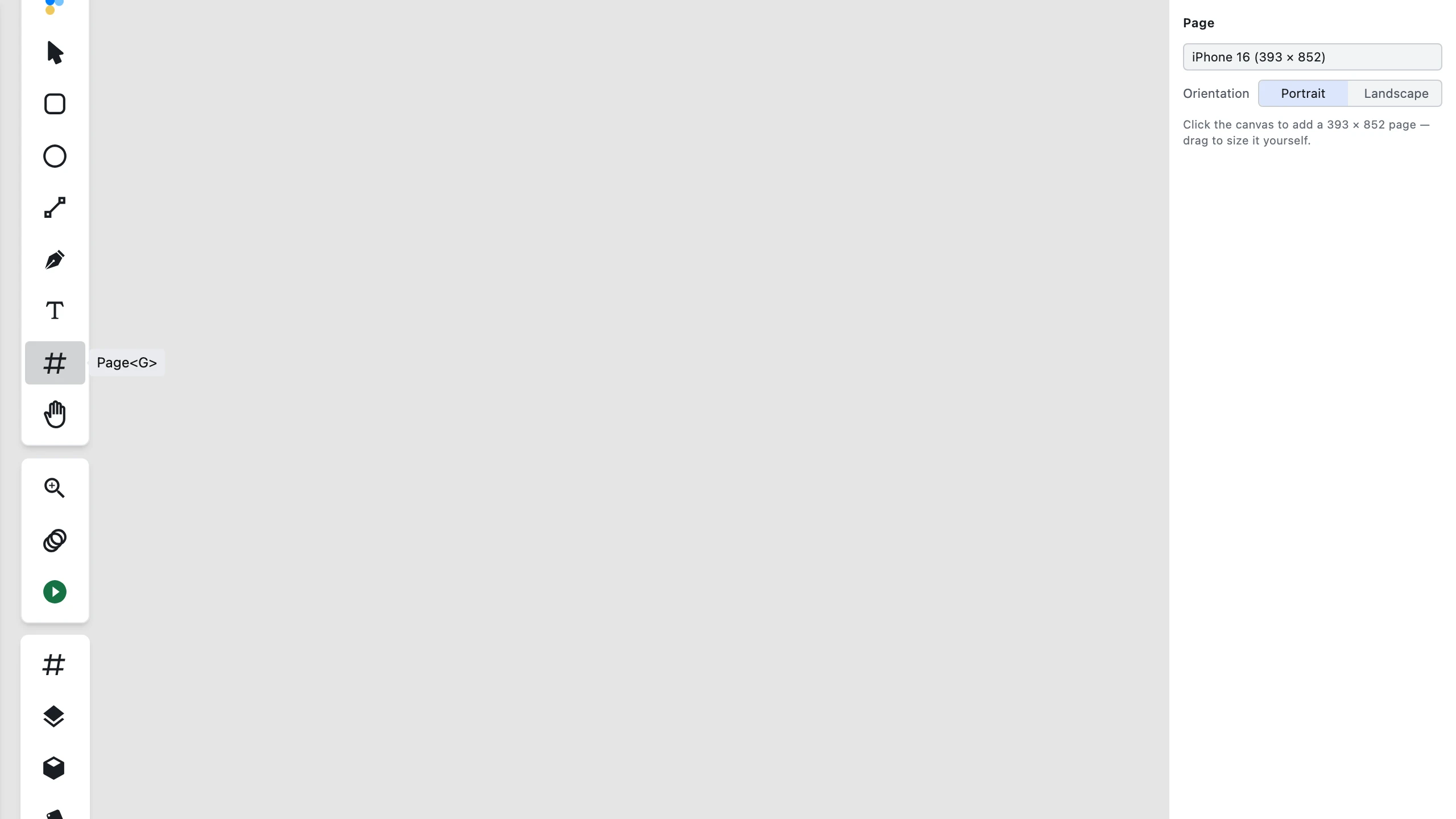
With the Page tool active, the right pane now offers a preset picker and a Portrait/Landscape toggle, using the same preset table the properties panel uses — so the two surfaces can never disagree. Click once on empty canvas and you get a page at that preset's dimensions in the chosen orientation. Leave the picker on Custom and a click still produces today's 400 × 200 default. A drag always wins over the pending preset, so sizing a page by hand works exactly as before, and your choice sticks for the rest of the session, including across tool switches. The picker is fully keyboard-operable, with the same category grouping as the properties-panel control.
Only the Page tool gains a panel; the Rectangle, Ellipse, Line, Path and Text tools leave the pane empty, as today.
Snapping you can switch off
Figpea has always snapped to the pixel grid, to other objects, and to rotation angles. There was no way to turn any of it off — the menu items existed in the source, commented out.
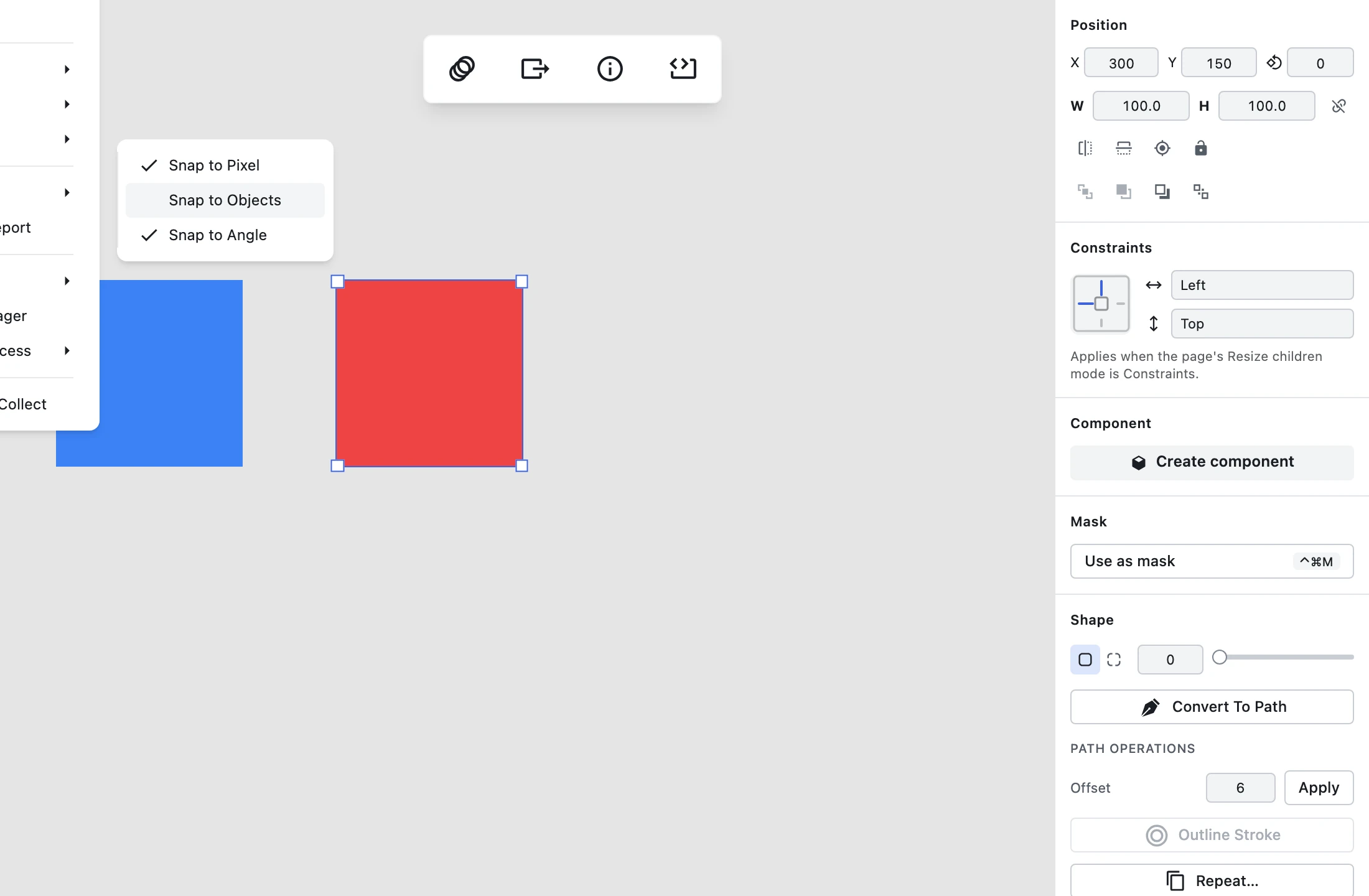
All three are now real toggles that genuinely enable and disable their strategy at drag and rotate time, and each one holds its state for the session across selection changes and tool switches. All three default to on, so if you never open the menu, nothing about Figpea's behaviour has changed.
Deliberately unchanged: Alt-to-suppress-while-dragging, the snap thresholds, and the rotation-snap convention (Figpea snaps by default and Shift disables — the inverse of Figma's, and flipping it would break existing muscle memory). Snap-to-geometry and a configurable grid are not here, because there is no working engine behind them to expose.
Drag a field's label to change its value
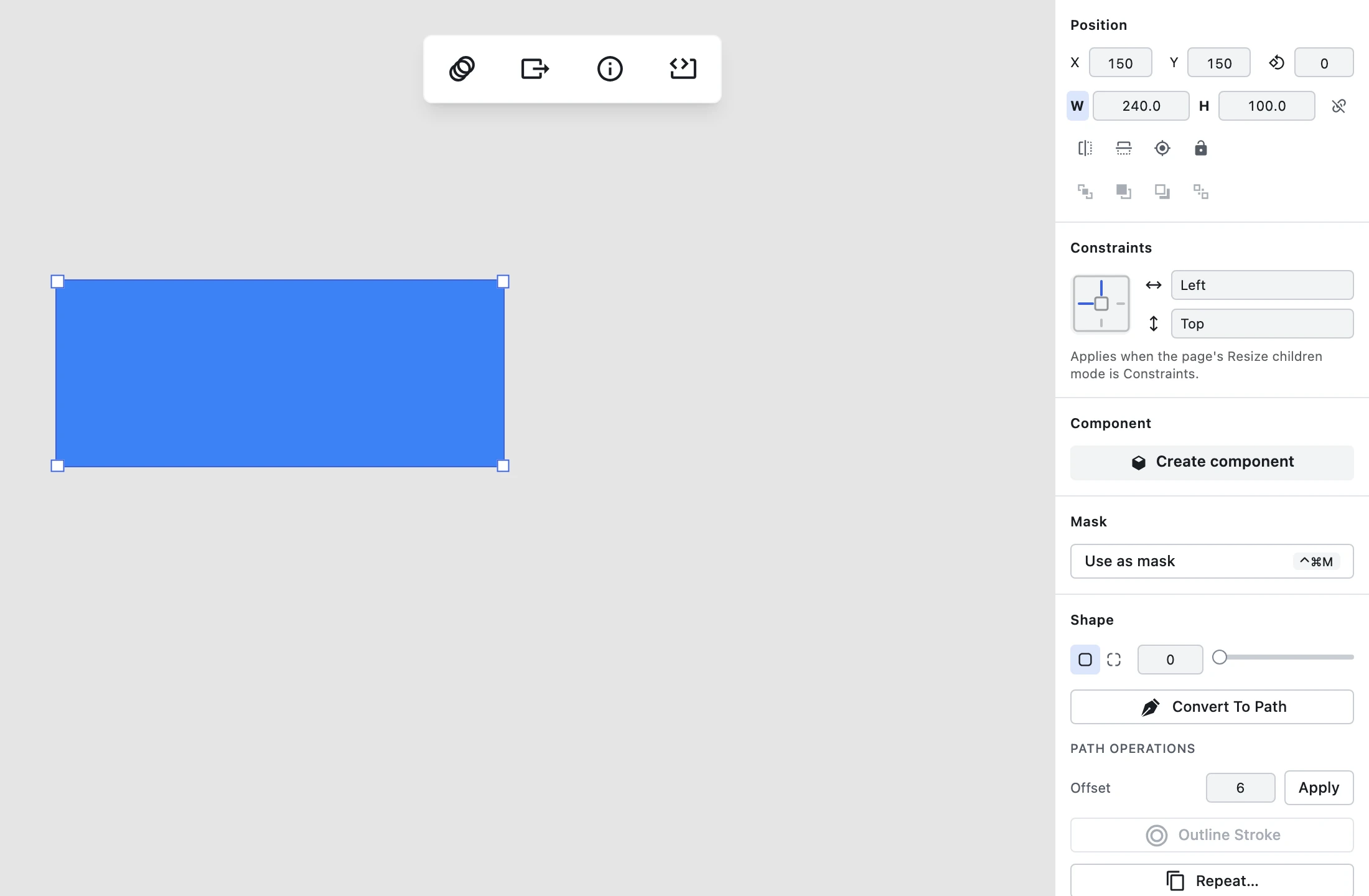
Press on the label of a numeric field and drag horizontally, and the value follows your pointer — live, through the field's own commit path. Scrubbable labels show an ew-resize cursor. Shift makes it coarse (×10) and Alt/Option makes it fine (×0.1), matching the nudge convention. The whole gesture, however many frames it spans, is one undo step. It works across the shared numeric field, so position, dimensions and rotation all scrub.
Two flip shortcuts landed alongside: Shift+H and Shift+V mirror the selection horizontally and vertically, identically to clicking the Position panel's flip buttons — one undo step each, with the buttons' tooltips now naming the shortcut. On a multi-selection the whole selection mirrors as a group about its collective bounding box, rather than each member flipping in place. The shortcuts don't fire while you're editing text or typing in an inspector field, so H and V still type.
Presentation no longer stops in the middle of your deck
If you were presenting on a free account, the paywall fired as you advanced past the fifth slide and force-quit the presentation. That is the worst possible moment to ask someone for money: they're mid-sentence in front of an audience, and the only thing the interruption reliably produces is a lost thread.
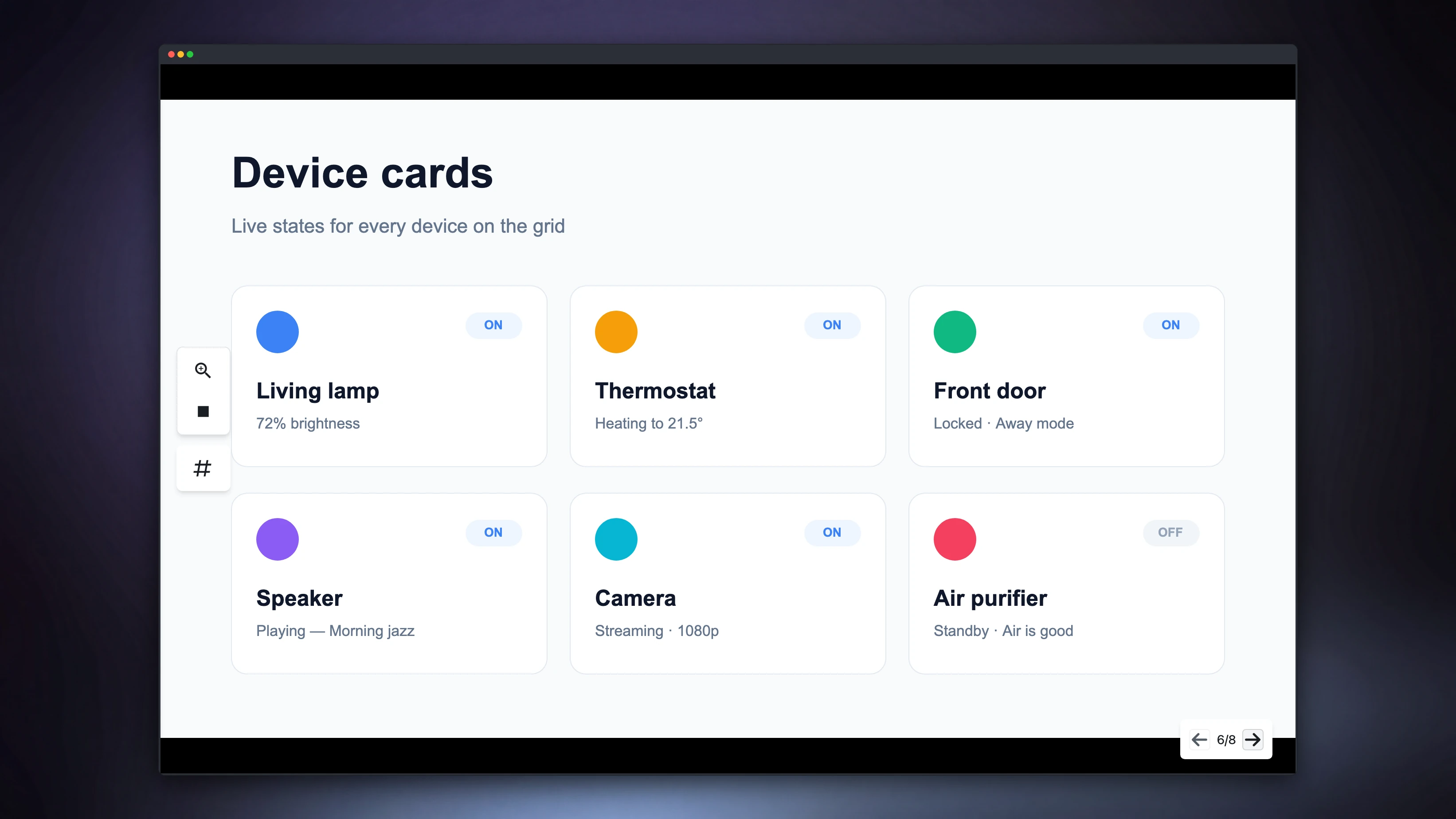
A free account now presents the whole deck, uninterrupted — no slide cap, no modal, no countdown, at any deck length. The upgrade prompt surfaces after you exit. Pro removes that post-exit prompt. The docs' plan tables say exactly this now, rather than describing the "first few screens" boundary the app used to enforce.
The paywall dialog itself was also failing quietly in a way that cost real purchases: when its price lookup failed, it silently degraded to a bare link that dropped the plan and billing intent, so following it landed you on the pricing page with nothing selected instead of starting checkout. The intent now survives a failed lookup, a single transient failure recovers on retry, and a previously-successful lookup is reused rather than re-fetched from scratch.
Editor fixes worth naming
- The transform widget's handles stayed a constant screen size only under non-uniform scale. Shift-drag a group — a uniform scale — and the handles grew with it, along with their clickable area, and stayed wrong after the drag ended for as long as the group was selected. They're a constant size now, still rotated with the box, with their centres unmoved.
- Marquee-selecting one shape inside a group selected the whole group — and resizing that mis-selection dragged the sibling shape along with it. A drag-select that encloses one child now resolves to that child, exactly as a plain click on it already did. Enclosing the whole group still selects the group.
- Text editing no longer crashes on a stale selection. Replacing a text layer's document while the editor still pointed at a path from the previous one threw on every style and font lookup; it now falls back to the same default it uses when nothing is selected.
- A nameless component state is reported as
State 1, notState 0. An operator-precedence bug meant??bound looser than+, so the index never got its+ 1. - A path operation could delete your shape instead of combining it. If any one source path in a unite, subtract, intersect or exclude wasn't valid path data, the whole operation bailed out and returned nothing — so the combined shape vanished entirely. This was our own doing: a previous release fixed a crash on the same input by aborting, which swapped a caught error for a worse outcome. An unusable base path is now treated as an empty one and the operation still runs; an unusable extra operand is dropped and the rest still combine. Both match how this same code already handles an empty path, rather than inventing a third rule.
- Right-clicking the middle of a layer you'd already selected did nothing. The hit test found no shape at coordinates that were squarely inside the layer's own bounds, so the canvas context menu never opened — reproducibly, at the exact centre. It opens now.
- The pen tool's drag-to-pull-a-curve gesture produced no curve. Dragging out from a new anchor left its control handle at zero offset, or at an offset that didn't match how far you had dragged. The handle now follows the drag, which is what makes the newly-documented pen authoring flow actually work.
- The gradient editor's inner-radius handle drew itself on the wrong side. While you dragged it, it rendered a half-turn away from your pointer, because its angle was computed from the pointer without the 180° its own geometry needs. Radial-gradient rotation itself — the outer handle, the Angle field, Rotate 90° — shipped in an earlier release; this was the one handle left behind, and the docs images for that page were re-shot against the fix.
- Cancelling a dialog left an undo step behind. Dismissing the asset-replace confirmation without confirming it still recorded history, so your next undo spent itself on an edit you had explicitly declined. Cancelling now changes nothing.
- Three inspector tooltips were cut off — Letter Spacing, Underline and Vertical Alignment rendered only 73–89% visible, clipped against the 252px panel's horizontal overflow boundary. They render in full. The text-formatting toolbar's ten buttons also came back onto the design system's size grid, from 22px onto it.
Google Drive: folders, and a Shared-with-me view
The Drive picker showed a flat, undifferentiated list of files with no folders in it at all. If your file lived in a folder — which is where most files live — you could not navigate to it.
The picker's My Drive view is now anchored at your Drive root with folders shown, so you can open a folder and pick the file inside it, and files shared with you are reachable from their own view rather than mixed into one list. Folders are navigable but never selectable, so a folder id can't be returned as your pick. The OAuth scope is still exactly drive.file — a per-file grant covering only the files you choose in the picker, with no Drive-wide read access — and no file-type allow-list has been reintroduced, so an .xd or .fig won't be hidden behind "No documents". The docs describe folder navigation and the shared view in prose; a capture of Google's own picker dialog is a tracked follow-up, and we'd rather ship no image than a made-up one.
Entitlements: a signed token instead of a shipped key
Figpea keeps working offline, so entitlement can't be a live server call at the point of use — it's a cached record with a 30-day ceiling, refreshed on every online boot. The design was right; the artifact wasn't. The cached record was symmetrically encrypted with a key shipped inside the client, which means anyone who read the bundle could write a valid-looking Pro record into their own browser.
The server now issues a signed token and the client verifies it locally against an embedded public key. A forged cache resolves to free and Pro claims stay blocked, while a genuine Pro user with a valid cached token still boots offline with every claim granted and no network call. The offline PWA path is otherwise unchanged.
Analytics that measure intent
measure_used was firing on hover state changes, which on an always-on measurement overlay means it fired on aimless mouse movement — 146,000 events in fourteen days, nearly thirteen times the whole analytics property's page-view volume. It now requires the pointer to come to rest, fires exactly once per layer pair, and stops firing as the pointer moves within the same pair. Sweeping across ten layers at a continuous pace produces zero events.
The file picker gained the events it never had. A picked, cancelled or dropped outcome now records itself, which matters because the open path's one silent-failure bug reached production, survived a full release cycle, and was found only because we personally hit it twice — there was no telemetry anywhere before openDesignFile.
The crypto library backing entitlement checks also came off the landing screen's boot payload, so it's no longer fetched before first paint on a page that doesn't need it.
For scripts and agents
- A Figma frame's auto-layout description is now decoded and preserved. Direction, item spacing, cross-axis spacing, wrap, alignment and sizing come through as structured metadata on the layer and read back through
layerTree(), instead of being discarded. To be precise about what this is and isn't: Figpea renders a.figfrom the file's own baked geometry, so child positions were already correct and this does not add a reflow engine — it makes the layout intent readable. A Figma grid auto-layout frame records a warning naming that mode rather than being quietly described as something it isn't. - The published agent contract caught up, and now has a guard.
/docs/agent-apiandllms.txtdeclare contract 1.8.0 — up from 1.6.0 across two steps in this release — andrasterized_fallbackis documented for.figas well as SVG and XD, which it had quietly become true of without the page saying so. More valuable than the catch-up itself: the build now checks the published contract version and the publishedfigpea-agentskill against the editor's own canonical copy, so this kind of drift fails a build instead of quietly riding along for three releases, which is exactly what it had done. The guard earned its keep inside this very cycle. The stroke work above widened the scriptable surface late, moved the editor to 1.8.0, and the site did not follow — and instead of that shipping quietly, it failed the release build. So the published reference now matches the editor exactly: thestrokeskey is documented, and the style round-trip is described as 36 keys rather than the 35 it had before the multi-stroke work.figpea.describe()is generated from the running build, so it is always the authoritative account of what the surface actually is. - The scriptable stroke surface reads and writes the multi-stroke list described above.
Site and docs
Six documentation gaps closed and six false claims removed.
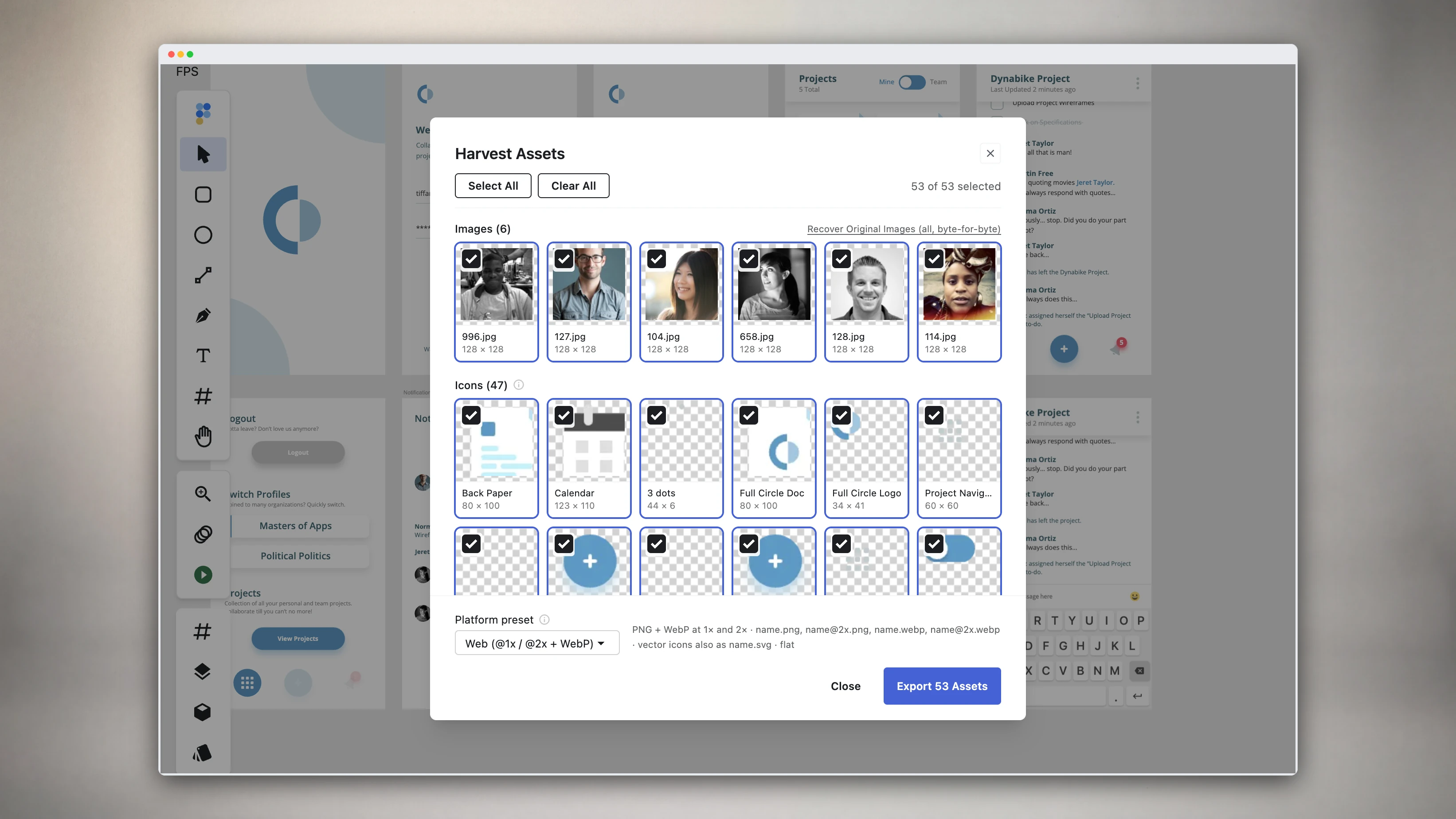
New and expanded: a dedicated Components and instances page explaining master, instance and override in the editor's own terms; a section on Asset Harvest, a shipped Pro export that had no user-facing documentation at all; and how to reuse a project image as a layer's fill on the Assets panel page.
The Path Editing page now documents the Pen tool — which had a toolbar slot and the P shortcut and appeared nowhere on this site — including drag-to-pull-a-curve authoring, and its modifier table is corrected. Photoshop colour-mode support is documented where a reader will look for it, and the mobile docs described above are new.
Eleven of eighteen docs articles carried zero images, on a site whose whole pitch is open the file and see it. Eight of them now carry real captures of the running editor, four of those with an animated capture of the gesture they teach plus a still of its end state, and a guard now fails the build if a docs article ships without one. Every image on this site is a capture of the actual product.
That last sentence is the whole reason Opening files was re-shot in this release too. The welcome-screen rework described above changed the first thing anyone sees, which instantly made every screenshot on that page a picture of software we no longer ship. It now carries the dashboard in both light and dark, and an animated capture of a Photoshop file being dropped onto the sidebar through to the document on the canvas, with the step-by-step prose pointing at the sidebar controls that actually exist rather than a header and a bottom bar that don't.
Six corrections, each of which was us stating something untrue:
/docs/basic-layer-operationsdocumentedCmd/Ctrl+Dtwice, eight lines apart, for two different actions — "Duplicate" and "Deselect". Neither binding exists in Figpea.- The site claimed SVG export runs SVGO and offered optimization-level and minification options. It doesn't, and there are none.
/docs/assets-panelopened by describing its Images list as "what your open project actually contains", then disclosed two sections later that PSD pixel-layer images aren't listed. The opening line is now scoped to what the list really covers./docs/opening-filesclaimed "complete support for PSD and PSB" and that it "preserves layer structure and effects". PSD is not our most mature parser and some effects come through as a baked native render; the page now says so./docs/gradient-editingshipped an image whose alt text said the gradient was "rotated 45 degrees", over a picture of an unrotated gradient. The root cause mattered more than the image: a capture step was silently skipping when its target didn't resolve, producing a screenshot of the default state with nobody the wiser. Capture steps now fail loudly when a step can't run, and the image was re-shot.- The v5.0.0 release post still told readers Pro was what you needed for "presentation playback". That stopped being true the moment a free account could present a whole deck, which happened in this release — so a post we published months ago was quietly selling a restriction we had just removed. It now names the actual Pro difference: presenting without the post-exit prompt. Old posts are still public claims, and they go stale when the product moves.
On discoverability: nine new format landing pages went live for searches we already rank for, the legacy psdetch blog slugs now permanently redirect to their canonical URLs, /blog finally has a meta description (it had none at all, not even a fallback), and the PDF and SVG viewer pages lead with Figpea's multi-format capability alongside — not instead of — the local-and-private claim, since "runs in your browser" is no longer a differentiator on its own. Two how-to posts also shipped: repeating a shape along a path, around a ring, or in a grid and vector path operations in your browser.
Reliability
One paragraph, because none of it is visible — but it is the part of this release we would least want to have skipped, because almost everything in it is a case of a check that looked green while measuring the wrong thing. Three standing production smoke checks had gone stale against the shipped interface and would have failed a correct build; they were rewritten against what actually ships. The end-to-end build guard gained a source-freshness check, so a run in an already-built worktree can no longer test a stale bundle and report green — and the requirements merged since that gap opened were re-audited against a correctly built binary. That guard then had to be fixed again during this very release prep: it detected a freshness mismatch, printed it, and let every test run anyway, which is a guard that reports rather than guards. Worse in kind, and found the same way: a design file we ship as a welcome-screen sample had drifted apart from the same-named fixture our .fig fidelity work was verified against — same name, same size, different bytes — so several of the fidelity fixes above had been proven against a file nobody can open. The two are reconciled, the deployed copy is recorded as the authoritative one, and a check now fails when a shipped sample and its fixture diverge. Two more checks turned out to be arguing with each other: a new production smoke test and the existing development test for the same behaviour reported opposite results, on page-size presets and on blend compositing. Rather than pick a winner by argument, both were re-derived from first principles — a real browser click for one, the W3C compositing formula by hand for the other — and in both cases the test was wrong and the product was right. Both specs were corrected with no tolerance widened and no assertion removed, which was checked by diffing them. Six site unit tests that had been red for the whole previous release cycle — cross-repo documentation drift rather than runtime breakage, but red is red, and a genuinely new failure hides in the noise — were cleared, and that class of drift is now checked mechanically on every build instead of being re-argued by a reviewer each release. The check works, and it proved it on us: the editor changes in this very release opened fresh documentation gaps of exactly the same kind — the published contract version and its copy of the agent skill, the key count of the style surface the new stroke work widened, and a disclosure row for a new file-picker analytics event — and this time they failed the release build instead of shipping quietly, and were fixed before it went out. PSD layer-effects rendering also picked up the test coverage its own review had asked for and not received, including a fixture that had been quietly skipping on a clean checkout. And the site's linting moved off a deprecated command onto the ESLint CLI, with the resulting rule set pinned against a golden so the migration can be proven not to have changed what gets checked.
Try it
Everything above is live now. Open Figpea, drag in an XD, PSD, SVG, PDF or Figma file — or pick one straight out of Google Drive, folders and all — and have a look. It's free to open, inspect and edit, a single 1× asset export is free, and you can now present a whole deck; Pro covers batch export, any-scale extraction, and presenting without the post-exit prompt. And it works on your phone now, so you can hand someone a link and expect them to actually open it.